
14-Slot Open Charging and Storage Rack
5.0Editor score
Fourteen independent slots
Adjustable leveling feet
Open-frame ventilation design
Discover the top charging stations for Chromebooks designed for classrooms and offices. This guide compares capacity, safety features, and organization for
Finding the right charging station for Chromebooks is essential for schools and offices managing multiple devices. A good solution keeps cords organized and prevents overheating while ensuring every laptop stays powered up for the day ahead.
We evaluated ten top-rated models based on capacity, build quality, and safety features like surge protection. Our comparison covers fixed racks, mobile carts, and multi-port hubs to help you choose the best fit for your space.
Each pick below highlights specific strengths such as open airflow designs or adjustable dividers for various device sizes. Please note that prices and availability change frequently so check current listings before making your final purchase decision.
5.0Editor score

4.7Editor score
This side-by-side comparison helps you visualize the key differences between the ten leading charging stations for Chromebooks available today. We highlight device capacity, power specifications, and design features so you can quickly identify the model that fits your organizational needs.


This POCHAR station offers a robust solution for smaller classrooms or offices needing to charge up to eight laptops at once. It holds a strong rating of 4.7 stars which reflects reliable performance and durability in daily use environments.
We may earn a commission when you buy through this link, at no additional cost to you.
The wide-angle slots are specifically designed to fit Chromebooks and laptops up to fourteen inches which is a significant advantage over smaller racks. Its included power strip ensures safe charging with surge protection to guard against voltage spikes.
While it lacks the capacity of larger carts the lack of assembly is a major plus for quick deployment. The trade-off is that it may not suit larger setups needing more than eight slots or mobile transport between rooms.
Buy this if you need a dependable fixed station for a small group of devices without the hassle of setting up complex racks. It provides a clean and organized look while keeping your essential tech powered and protected.
The design supports devices up to fourteen inches and one point four inches thick which covers most standard Chromebooks.
Built-in surge protection protects your investment from electrical spikes ensuring long term reliability during charging sessions.
We may earn a commission when you buy through this link, at no additional cost to you.
This station stands out by offering both AC outlets and USB ports allowing you to charge laptops and phones simultaneously. With a solid rating of 4.4 it serves as a versatile hub for offices with mixed device ecosystems.
We may earn a commission when you buy through this link, at no additional cost to you.
The inclusion of four USB ports means you can charge smaller devices without needing extra adapters while the six AC outlets handle larger laptops. The integrated cable management system helps keep cords organized reducing visual clutter on your desk.
However the higher price might be a consideration if you only need basic laptop storage. Additionally the vertical layout requires some attention to cable routing to ensure everything stays neat over time.
Choose this if you manage a mix of laptops and mobile devices in a shared workspace. It offers a practical balance of power options and organization that supports efficient workflows without taking up too much room.
Combining AC outlets with USB ports allows flexible power delivery for a wide range of electronic devices.
Integrated cable routing helps manage cords effectively keeping the workstation tidy and professional looking.
We may earn a commission when you buy through this link, at no additional cost to you.
With a perfect five star rating this rack offers impressive capacity for a low price making it an excellent budget choice. It features fourteen independent slots which can handle a large classroom inventory efficiently and safely.
We may earn a commission when you buy through this link, at no additional cost to you.
The open frame design promotes natural airflow preventing overheating during long charging sessions. Solid steel construction ensures stability and longevity even in high traffic environments where devices are frequently moved in and out.
Note that you will need to supply your own power strip and assemble the unit yourself. While this adds a small step to setup it keeps the overall cost down and gives you control over your power solutions.
Ideal for schools or offices on a tight budget this rack delivers maximum value for the money. It is a sturdy foundation for your device storage needs and allows you to scale up power options as required.
Open frame ventilation ensures devices stay cool during extended charging periods reducing the risk of overheating.
Four adjustable leveling feet allow the rack to sit flat and stable on uneven surfaces preventing wobbles.
We may earn a commission when you buy through this link, at no additional cost to you.
This station prioritizes device safety with padded shelves that prevent scratches and damage during storage. The UL certified power strip adds a layer of confidence regarding electrical safety for students and staff using the unit daily.
We may earn a commission when you buy through this link, at no additional cost to you.
The open cart design allows for quick access which is essential in classroom settings where students need to grab devices quickly. Removable dividers mean you can adjust the layout to fit larger laptops or tablets as needed.
However assembly is required which might delay immediate use. Also the lack of a current rating makes it harder to gauge long term reliability compared to other models on this list.
Pick this if device protection is your top priority and you have time to set it up properly. It offers a safe and organized environment for Chromebooks and tablets with built-in power safety features.
Soft pads on shelves and plastic dividers protect devices from accidental scratches and physical damage.
The power strip inside the charging cart is UL approved providing a safety guarantee for daily use.
We may earn a commission when you buy through this link, at no additional cost to you.
This charging hub is a powerhouse for USB-C laptops and mobile devices delivering 600W across twenty ports. It rates highly at 4.8 stars thanks to its smart GaN technology and real-time temperature monitoring for safe charging.
We may earn a commission when you buy through this link, at no additional cost to you.
The station includes ten short cables in various types which helps eliminate wall charger clutter and keeps your setup neat. It features physical slots that hold devices upright preventing tangles and keeping them organized while powered.
Keep in mind this does not have standard AC outlets so it only works with USB-C capable devices. This limitation means it may not suit all laptop types but is perfect for modern Chromebooks and phones.
Great for offices switching to USB-C laptops this station maximizes efficiency and safety. It is an excellent choice for reducing cable mess while ensuring all your connected gadgets stay charged without overheating.
Advanced GaN technology ensures efficient power delivery and prevents overheating during multiple device charging.
Includes ten short mixed charging cables to help you avoid long messy cables and wall charger clutter.
We may earn a commission when you buy through this link, at no additional cost to you.
This mobile cart is designed for large scale device management allowing you to transport twenty Chromebooks easily between rooms. It carries industrial-grade materials and locking casters making it a premium choice for busy schools or training centers.
We may earn a commission when you buy through this link, at no additional cost to you.
Each slot can accommodate laptops up to fifteen point six inches and features adjustable dividers for flexible organization. The built-in power strip supports convenient multi-device charging while keeping cords managed and neat at the back.
As a newer product there are no user ratings to confirm long term reliability yet. The higher price point is expected given the mobile design and heavy duty construction suited for commercial environments.
Invest in this if you need to move devices frequently between classrooms or offices. It provides a robust and organized solution for managing large fleets of Chromebooks with minimal effort and high safety standards.
Four durable swivel casters with locking options allow you to move the cart effortlessly between spaces safely.
Removable dividers allow you to customize the storage layout based on different device sizes and needs.
We may earn a commission when you buy through this link, at no additional cost to you.
This station offers a secure and organized way to store ten devices while keeping them charged safely. It rates well at 4.7 stars and features an open frame design that promotes airflow to prevent overheating during charging.
We may earn a commission when you buy through this link, at no additional cost to you.
The heavy-duty steel frame ensures stability and resistance to deformation even in high traffic areas. A lower storage tray provides handy space for chargers or cables keeping them out of reach but accessible when needed.
The fixed slot width means it may not adapt to very large devices compared to models with adjustable dividers. However the sturdy build and reliable power strip make it a safe choice for consistent daily use.
Choose this if you need a reliable ten-slot station that prioritizes safety and organization. It is perfect for classrooms or offices where maintaining order and device longevity is essential for daily operations.
The open-frame structure promotes optimal airflow to reduce overheating risks during extended charging sessions.
Built-in cable clips eliminate tangled cords keeping the charging area neat and professional looking.
We may earn a commission when you buy through this link, at no additional cost to you.
This Belkin station is a reliable choice for organizing ten devices with strong surge protection built in. It holds a rating of 4.3 and features wide-angle slots that accommodate many standard tablets and laptops securely.
We may earn a commission when you buy through this link, at no additional cost to you.
The mountable design allows you to attach it to AV carts or desks providing flexibility in how you organize your space. It includes a connected equipment warranty which adds extra peace of mind for schools or businesses.
The unit fits most cases up to 1.18 inches so thick protective cases might not fit in all slots. This limitation is worth checking before purchase if your devices have bulky cases installed regularly.
Ideal for AV cart integration or wall mounting this station offers flexibility and safety. It is a trusted name in power protection and suits environments where equipment safety and reliable charging are top priorities.
Securely mount the station to a desk or table or move it easily between classrooms with standard AV carts.
Includes surge protection and a warranty for connected equipment to safeguard your devices from electrical issues.
We may earn a commission when you buy through this link, at no additional cost to you.
This station offers fast charging via GaN technology providing 420W across ten ports for efficient power delivery. It enjoys a strong 4.5 rating and features durable one-piece slots that hold laptops and tablets securely.
We may earn a commission when you buy through this link, at no additional cost to you.
The wide port variety allows charging for various devices from phones to laptops with dedicated high power slots for MacBooks. Non-slip rubber pads on the bottom keep the station stable and protect your desktop from scratches.
Be aware that this model only has USB ports so it requires USB-C or USB-A capable devices to work. It lacks standard AC outlets which limits use for devices needing traditional chargers or larger power requirements.
Select this if you need fast and safe USB charging for a range of devices. It is a practical and affordable solution for keeping multiple gadgets powered up quickly without cluttering your desk with wall adapters.
Top ports provide up to 65W charging speed which is perfect for powering laptops quickly and efficiently.
One-piece flame-retardant ABS design ensures a longer lifespan than stations with removable dividers.
We may earn a commission when you buy through this link, at no additional cost to you.
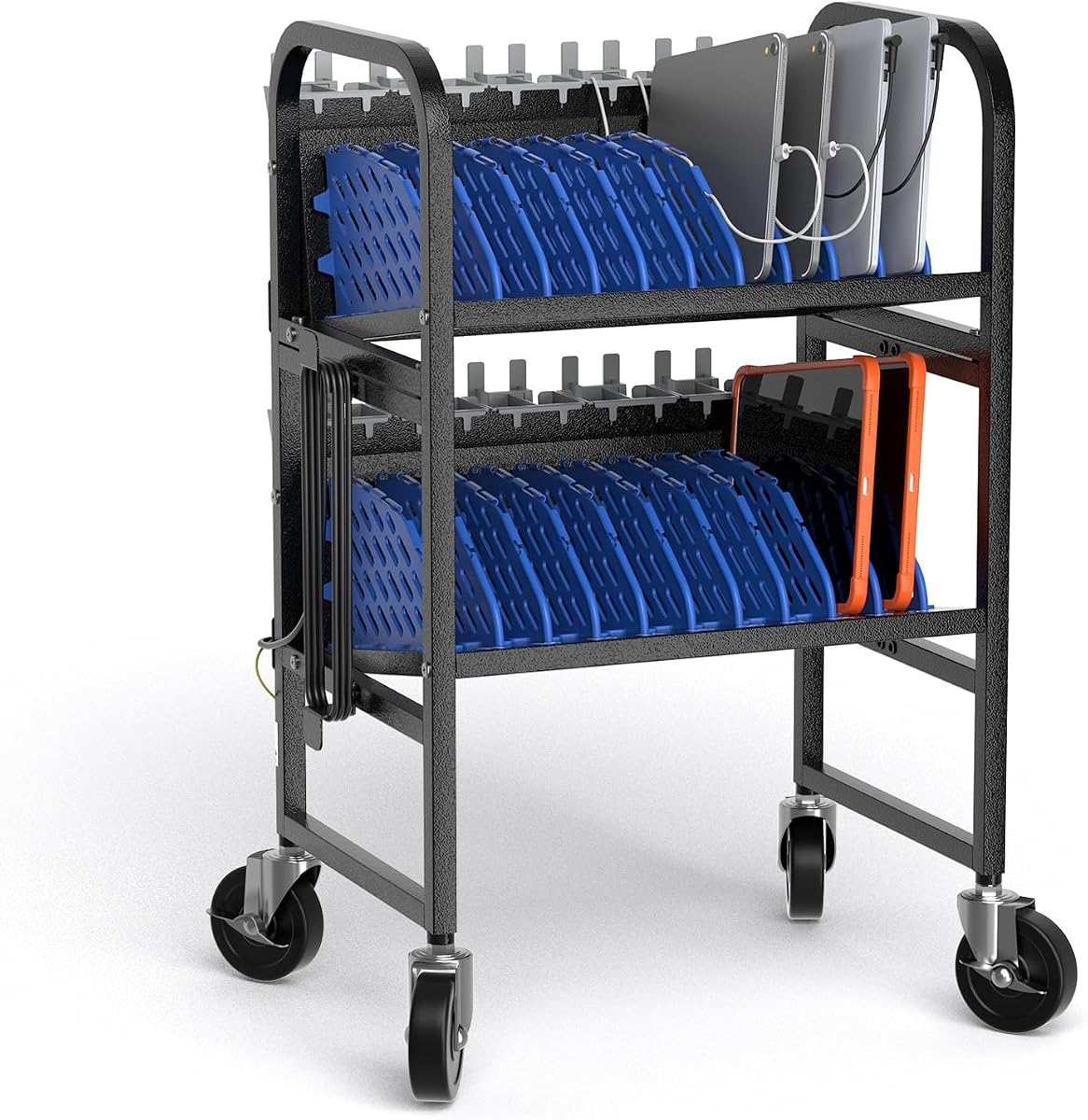
This mobile rack earns a perfect five-star rating for its solid construction and thoughtful design features. It holds ten devices securely while allowing easy transport between classrooms thanks to smooth rolling casters with locking brakes.
We may earn a commission when you buy through this link, at no additional cost to you.
The open design promotes optimal airflow keeping devices cool during charging and the integrated cable clips help keep cords organized. Wipe-clean surfaces make maintenance effortless ensuring it stays looking professional even after heavy daily use.
Note that it does not include a power strip so you will need to supply your own power source for charging. Despite this small requirement the easy setup and durable build make it a great value for schools.
Ideal for mobile classrooms or labs this rack offers a secure way to move and store devices. It combines safety, mobility, and organization at a budget-friendly price point that fits many institutional needs.
Four smooth-rolling casters with two brakes allow secure parking and easy transport between rooms.
Durable wipe-clean surfaces make maintenance effortless ensuring the station always looks professional with minimal effort.
We may earn a commission when you buy through this link, at no additional cost to you.
Choosing the right charging station requires balancing capacity safety and space constraints. Use the factors below to find a model that fits your specific organizational needs.
The number of slots determines how many devices you can charge at once. Consider your class size or office headcount and choose a model with extra capacity for future growth. Fixed slots may limit flexibility whereas adjustable dividers allow you to fit larger laptops or tablets.
Always check the maximum dimensions allowed per slot to ensure your specific Chromebooks will fit comfortably without risk of damage.
Look for stations with surge-protected power strips to guard against voltage spikes that can damage expensive electronics. Some models offer both AC outlets and USB ports giving you flexibility to charge phones and tablets without extra adapters.
Ensure the wattage output is sufficient for fast charging multiple laptops simultaneously especially for modern USB-C devices.
Overheating is a risk when charging multiple devices. An open frame design promotes natural ventilation preventing heat buildup during long sessions. Also verify that the power strip has certifications like UL listing for electrical safety.
Stability is also key so look for rubber feet or adjustable leveling to keep the unit from tipping over.
Tangled cords create hazards and clutter. Best models feature built-in cable clips or routing holes to keep power cords organized and out of the way. Some even include short charging cables to reduce the need for loose adapters.
Effective cable management saves time and makes it easier to troubleshoot connection issues quickly.
If you need to move devices between rooms look for a mobile cart with locking casters and handles. These allow easy transport while ensuring the unit stays stable during charging. Heavy-duty materials will handle the stress of frequent movement.
Fixed racks are more stable but less versatile if your device usage patterns change regularly.
Schools and offices need units that withstand daily use. Steel frames offer more longevity than plastic alternatives. Check for padded shelves if protecting devices from scratches is a priority in your environment.
Investing in a sturdy unit now can save money on repairs or replacements in the long term.
Some units require assembly while others come ready to use. Quick setup is beneficial for urgent needs but assembly might save on shipping costs. Verify if tools are needed and how long setup typically takes.
Ready-to-use models can be deployed immediately saving valuable time for IT staff or teachers.
A good warranty protects your investment against defects and failures. Look for brands that offer equipment coverage for connected devices. Check the return policy and customer support availability before buying.
Peace of mind is important when managing expensive tech so prioritize models with solid backing.
Place the station on a level surface away from direct heat sources to ensure optimal airflow and safety. Connect the power strip to a wall outlet that matches the voltage requirements of the unit.
Arrange your Chromebooks in the slots making sure each device is securely seated before plugging in the charger. Route cables through management clips to avoid tangling and tripping hazards around the base.
Regularly wipe down the shelves and frame with a damp cloth to remove dust and debris that could cause overheating. Periodically check cables for signs of wear and replace them if insulation is damaged.
Most models accommodate standard Chromebooks up to 14 or 15.6 inches but check slot dimensions before buying. Adjustable dividers allow flexibility for larger screens while fixed slots may limit size options. Measure your devices to ensure a safe fit.
Some units include an integrated power strip while others do not. Always check the product details to see if power is included. If not you will need to buy a separate surge-protected strip for safe charging.
Yes most stations are designed to handle both Chromebooks and tablets like iPads. Wide-angle slots accommodate various shapes and thicknesses making them versatile for mixed device environments. Ensure your tablets fit within the slot dimensions.
Choose a station with an open frame design for better airflow around devices. Avoid stacking items on top of the station and leave space around vents. Regular cleaning of dust from the unit also helps maintain cool temperatures.
Units with surge protection and temperature monitoring features are generally safe for overnight use. However it is always good practice to check devices periodically. Models with GaN technology specifically manage heat better during long sessions.
Mobile carts with casters are designed for easy transport between rooms. Fixed desktop racks are harder to move so consider your workflow. Locking wheels ensure the cart stays stable when stationary and safe during transport.
Steel frames are more durable and long-lasting for high traffic environments compared to plastic. Look for models with powder-coated or painted finishes to resist rust and scratches. Padded shelves add an extra layer of protection for devices.
Use the built-in cable clips or routing holes provided on most modern stations. Short cables help reduce excess length and mess on desks. Regularly tidy cords to keep the workspace safe and visually clean.
The POCHAR 8-Device Universal AC Laptop Charging Station stands out as the top pick for small classrooms needing reliability and easy setup. The 14-Slot Open Charging Rack offers unbeatable value for high capacity while the POCHAR 20-Device Mobile Cart delivers premium mobility.
Prioritize safety features like surge protection and ventilation when selecting a model to protect your devices from damage. Also consider whether you need mobility or a fixed unit based on how your devices are used daily.
Check current prices and availability before purchasing as costs may vary by seller. These guides reflect the best available options as of November 2026 to help you make an informed choice.