
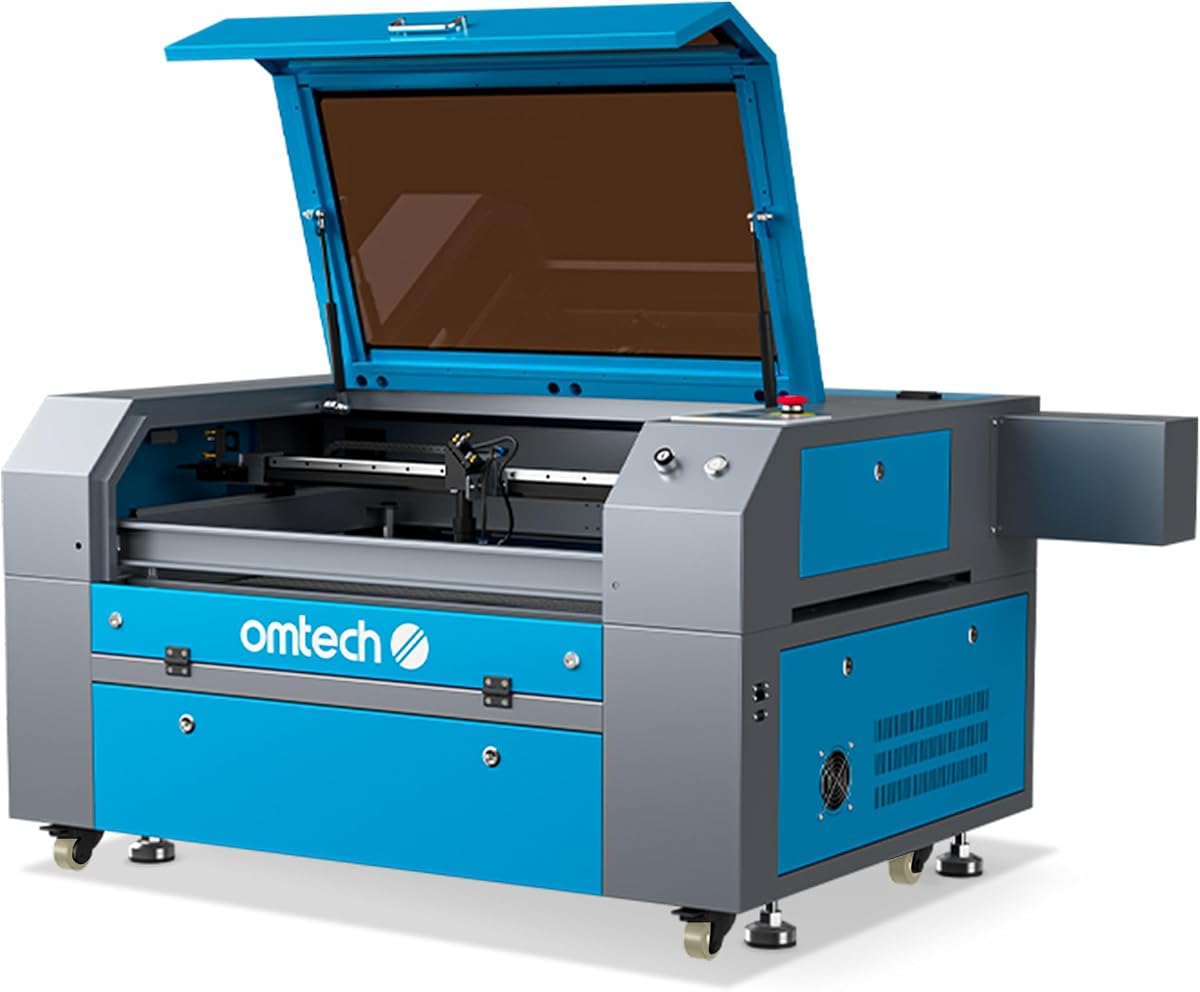
OMTech K40+ 45W Desktop CO2 Laser Engraver & Cutter
4.4Editor score
45W laser power
12×8 inch workspace
LightBurn compatible
Finding the right CO2 Laser Engraver can transform your creative projects into reality. Whether you need precise cuts for acrylic or detailed etching on wood, these machines offer versatility. Understanding power output and work area helps you select the ideal tool for your workshop.
We compared leading models based on laser power, speed, and software support. Our analysis covers budget-friendly options alongside professional-grade machines. Each product was evaluated for ease of use, safety features, and overall value to ensure you find a reliable solution for your crafting demands.
Each pick highlights specific strengths like autofocus, air assist, and pass-through doors. Prices and availability change frequently so verify details before purchasing. This guide aims to simplify your decision-making process with clear comparisons and expert insights into what matters most for CO2 laser technology.
4.4Editor score

5.0Editor score

4.5Editor score
As an Amazon Associate we earn from qualifying purchases.
This side-by-side comparison reviews all ten CO2 Laser Engraver models to highlight key differences in power, workspace, and features. Use this table to quickly identify which machine aligns with your specific project requirements and budget constraints.



The VEVOR 45W CO2 Laser Engraver stands out with a perfect user rating and robust feature set. It is designed for hobbyists needing reliable performance on wood and acrylic without complex setup. The built-in rotary axis expands possibilities for cylindrical items.
We may earn a commission when you buy through this link, at no additional cost to you.
Its 45W laser cuts through materials efficiently while the air assist keeps edges clean. Compatibility with LightBurn and GRBL ensures seamless workflow across different design tools. The focus knob and red-dot positioning make adjustments straightforward and accurate.
Users might find the 12×8 inch area limiting for large batches. Manual focusing requires attention but ensures precise control over every job. These trade-offs are acceptable for small creators prioritizing precision over bulk speed.
Buy this model if you need a reliable desktop engraver for personal projects. It balances performance and ease of use effectively. Ideal for phone cases and coasters where detail matters most.
The included rotary axis allows engraving on bottles and cylinders expanding creative options significantly.
Built-in air assist clears smoke and dust ensuring burr-free edges and protecting the lens.
We may earn a commission when you buy through this link, at no additional cost to you.
The OMTech K40+ 45W offers exceptional value for those entering the world of laser engraving. It delivers powerful cutting and engraving at a price point accessible to DIY makers. Global support and a two-year warranty add peace of mind.
We may earn a commission when you buy through this link, at no additional cost to you.
Its 45W laser slices through acrylic and wood with ease while the integrated air assist reduces fire risk. Compatibility with LightBurn and LaserGRBL makes setup smooth for beginners. Safety features like water protection are essential for home use.
The compact workspace might limit larger projects but suits small items well. Basic safety systems are adequate but lack advanced automation found in premium models. These limitations are manageable for users focused on smaller scale production.
Choose this machine if you want a reliable starter laser without overspending. It provides professional results for personal projects and small businesses. Ideal for keychains and custom tags where cost efficiency matters.
Upgraded 45W power allows faster cuts and deeper engraving compared to older entry level models.
Door protection and emergency stop function ensure safe operation during extended cutting sessions.
We may earn a commission when you buy through this link, at no additional cost to you.
The xTool P3 80W is a flagship machine delivering industrial-grade performance for serious creators. Its automated creation system with LiDAR ranging eliminates guesswork from setup. This model excels in speed and precision with massive workspace capabilities.
We may earn a commission when you buy through this link, at no additional cost to you.
Cutting speed reaches 1200 mm/s allowing rapid production of complex designs. Dual HD cameras provide accurate positioning while Class 1 safety ensures enclosed operation. Smart Nesting optimizes material usage reducing waste during mass customization projects.
The high cost may be prohibitive for casual users. Advanced features require learning but offer long-term efficiency gains. These trade-offs are acceptable for businesses needing reliable high-volume output.
Invest in this model if you need professional automation and speed. It transforms workflows from manual to intelligent production. Ideal for large-scale custom merchandise and detailed acrylic cutting.
ACS integrates LiDAR and dual cameras for perfect focus and positioning without manual adjustments.
80W power cuts 25mm acrylic effortlessly with clean edges and minimal carbonization.
We may earn a commission when you buy through this link, at no additional cost to you.
The OMTech Maker 60W offers a balanced approach with commercial features at a mid-range price. Autofocus technology simplifies setup while the large workspace handles bigger items. Included water chiller ensures consistent laser performance over time.
We may earn a commission when you buy through this link, at no additional cost to you.
Its 20×28 inch bed accommodates various projects from signage to apparel. Pass-through doors allow long materials without repositioning. Air assist removes smoke protecting lenses during extended engraving sessions.
Manual bed adjustments might slow down initial setup compared to full automation. The price reflects the included accessories but remains high for hobbyists. These factors are acceptable for small businesses needing capacity.
Choose this if you need more space and automation without full flagship cost. It handles diverse materials efficiently. Ideal for medium-sized shops expanding their production capabilities.
Preinstalled autofocus automatically finds focal distance reducing setup time significantly.
20×28 inch area fits most projects while pass-through doors handle long items easily.
We may earn a commission when you buy through this link, at no additional cost to you.
The OMTech Maker 90W provides powerful cutting and engraving for large scale designs. Its 90W DC laser tube offers long operational life supporting continuous workflows. Spacious workspace accommodates both delicate and large projects.
We may earn a commission when you buy through this link, at no additional cost to you.
Automatic cover interlock enhances safety by shutting off the laser when opened. Integrated air assist ensures clean engraving while protecting mirrors. The window is designed for lasting safe use during operation.
Lack of rating data may cause uncertainty for buyers. High cost is justified by power and durability but requires investment. These factors are acceptable for professional users prioritizing reliability.
Invest in this if you need high power for industrial tasks. It delivers consistent results for large batches. Ideal for custom furniture and commercial signage.
90W DC tube provides up to 12000 hours of reliable operation for heavy use.
Automatic cover interlock shuts off laser when opened ensuring user safety at all times.
We may earn a commission when you buy through this link, at no additional cost to you.
This variant of the OMTech K40+ offers consistent value with a higher rating. It retains all essential features like 45W power and air assist. Global support ensures help is available for technical guidance.
We may earn a commission when you buy through this link, at no additional cost to you.
The integrated air assist auto-adjusts based on laser power for optimal results. Safety features like door protection and emergency stop function prioritize user safety. Wide software compatibility makes it versatile for different design workflows.
Compact workspace limits bulk production but suits small projects. Manual adjustments may slow down complex jobs. These limitations are manageable for personal crafting needs.
Choose this for affordable entry with reliable support. It balances cost and quality well. Ideal for hobbyists seeking a trusted desktop solution.
24/7 global support team ensures expert assistance and local demos by appointment.
Door protection and flame retardant panel protect users during high power cutting jobs.
We may earn a commission when you buy through this link, at no additional cost to you.
The OMTech Pronto 100W delivers revolutionary speeds and power for efficient workflows. Its 100W tube cuts through thick materials quickly. Large workspace fits most projects while autofocus simplifies setup.
We may earn a commission when you buy through this link, at no additional cost to you.
Airflow systems ensure clean cuts and reduced burn. Safety features include water protection and temperature alarms. These features support continuous and safe operation for demanding tasks.
Lack of rating data may delay decisions. High cost reflects performance capabilities. These factors are acceptable for professional users prioritizing output.
Choose this if you need speed and power. It handles bulk orders efficiently. Ideal for commercial production.
Engraving speeds up to 1000 mm/s transform creative visions into reality quickly.
Air pump and turbo exhaust fan keep workspace tidy and cuts precise.
We may earn a commission when you buy through this link, at no additional cost to you.
The OMTech Maker 90W earns a perfect rating for consistent performance. Its high-performance tube delivers power for extensive usage. Water chiller ensures stable laser output during long sessions.
We may earn a commission when you buy through this link, at no additional cost to you.
Cover interlock enhances safety while air assist protects lenses. Large workspace fits diverse projects. Software compatibility ensures seamless navigation and control.
Size and price are considerations for small spaces. These trade-offs are acceptable for quality seekers. Ideal for businesses.
Choose this for reliability and power. It handles large items easily. Ideal for signage.
Delivers 90W of power for up to 8000 hours of reliable usage.
Cover interlock automatically cuts beam if window is opened ensuring safe use.
We may earn a commission when you buy through this link, at no additional cost to you.
The OMTech 100W CO2 Laser offers speed and size for large jobs. Instant autofocus eliminates guesswork. Steady motors ensure controlled movement. Air pump keeps dust in check.
We may earn a commission when you buy through this link, at no additional cost to you.
Pass-throughs accommodate long materials. Sensors monitor conditions for safety. Software supports your favorites. These features support bulkier projects.
Lack of ratings is a trade-off. Size and price suit professionals. These factors are acceptable for commercial users.
Choose this for speed and capacity. Ideal for large-scale cuts.
Smart autofocus feature fine-tunes focal point with a single button press.
Air pump and turbo exhaust keep workspace tidy and cuts clean.
We may earn a commission when you buy through this link, at no additional cost to you.
The OMTech Maker 90W offers powerful cutting and engraving for large ideas. 90W tube provides reliable operation. Pass-through doors accommodate long items. Cover interlock keeps users safe.
We may earn a commission when you buy through this link, at no additional cost to you.
Integrated air assist keeps area free from smoke. Global support ensures personalized care. These features enable flawless results.
No rating data may be a concern. Size and price suit pros. These are acceptable for commercial users.
Choose this for power and space. Ideal for commercial signage.
High-performance tube provides up to 12000 hours of reliable operation.
24/7 global support team delivers expert assistance and local demos.
We may earn a commission when you buy through this link, at no additional cost to you.
Selecting the ideal CO2 Laser Engraver depends on your project scale material types and budget. This guide covers critical factors to consider before buying.
Laser power measured in watts determines how quickly you can cut materials and how thick they can be. Higher power like 90W or 100W allows deeper cuts and faster speeds suitable for commercial work. Lower power like 45W is sufficient for hobbyists and thin materials.
Choose higher wattage for frequent use and thicker materials to ensure longevity and efficiency.
The work area defines the maximum size of items you can engrave or cut without repositioning. Larger beds like 20×28 inches accommodate big projects like signs or clothing. Smaller beds like 12×8 inches save space and suit small crafts.
Pick a size that matches your typical project dimensions to save time and effort.
Software determines how easily you can design and control the engraver. Look for support for popular tools like LightBurn or RDWorks for intuitive design. Open-source compatibility offers flexibility for advanced users.
Ensure your chosen software supports the specific machine model for seamless workflow.
Air assist directs airflow to the cutting area to remove smoke and debris. This prevents fire hazards and keeps the lens clean for better focus. Integrated systems are more efficient than external fans.
Always choose a model with a built-in air assist for safety and better finish quality.
Safety features protect users from laser exposure and fire risks. Look for door interlocks that stop the laser when open and emergency stop buttons. Flame-retardant panels are essential for indoor use.
Prioritize models with comprehensive safety systems to protect yourself and your workspace.
Autofocus reduces setup time by automatically adjusting the laser to the correct focal point. This ensures consistent results without manual trial and error. Manual focus is cheaper but requires precision.
Invest in autofocus if you process different material thicknesses frequently for efficiency.
CO2 lasers require cooling to prevent tube damage. Water chillers provide precise temperature control for long runs while air cooling is simpler. Integrated chillers ensure consistent performance.
Choose a machine with a reliable cooling system to extend the tube life significantly.
Reliable support ensures you get help when technical issues arise. A minimum two-year warranty protects your investment against defects. Global support teams offer localized assistance.
Verify warranty terms and support availability before purchasing for long-term reliability.
Always start by calibrating the focus to ensure sharp cuts and clear engravings. Clean the lenses and mirrors regularly to prevent debris from affecting beam quality. Use the air assist during all operations to keep the workspace smoke-free.
Set the correct laser power and speed based on the material you are cutting. Test on scrap pieces before starting full projects to avoid damaging materials. Ensure proper ventilation to exhaust fumes safely from your workspace.
Store the machine in a dry environment to protect electronics from humidity. Schedule routine maintenance checks on belts and motors to maintain precision. Keep a log of usage hours to track tube performance and schedule replacement.
CO2 laser engravers typically cut wood, acrylic, leather, and fabric effectively. They can also engrave glass and coated metals with care. They cannot cut untreated metal or glass directly without coating.
Yes, it is safe if you follow safety protocols like using enclosed models with Class 1 ratings. Ensure good ventilation to remove fumes and wear protective eyewear. Always use built-in safety interlocks.
Maintenance involves cleaning lenses and mirrors weekly and checking alignment. Regularly monitor water levels for chillers and replace tubes after 8000 hours. Keep moving parts lubricated for smooth operation.
Most machines work with LightBurn or RDWorks which are industry standards. Ensure the software supports your specific model for easy control. Design files can be imported from vector tools like Illustrator.
Yes, with a rotary axis attachment you can engrave cylindrical items like bottles. This accessory rotates the object for consistent engraving around curves. Ensure your machine supports rotary axis integration.
Tube life typically ranges from 8000 to 12000 hours depending on usage. Proper cooling and regular cleaning extend this lifespan significantly. Avoid continuous operation without breaks to preserve performance.
We reviewed ten top CO2 Laser Engraver models including the VEVOR 45W for hobbyists and the xTool P3 80W for professionals. Each offers unique strengths depending on your budget and project scale. Consider power and workspace size for best results.
Prioritize safety features like air assist and interlocks to ensure safe operation. Automation tools like autofocus save time during frequent setups. Match the machine to your specific needs for best workflow.
Verify current prices and availability before purchasing since values fluctuate. Check warranty terms to protect your investment long-term. Choose a model that balances performance with reliability.