4.6Editor score
In this guide
Modern homes often rely on coaxial cabling for TV and internet services. Converting this existing infrastructure into a reliable wired network can dramatically improve performance for streaming and gaming devices.
We evaluated ten leading adapters based on speed capabilities, installation ease, and compatibility with major ISPs. Our analysis focuses on real-world performance metrics and user feedback to ensure accurate recommendations.
Each pick highlights specific strengths for different household needs. Prices fluctuate frequently, so verify current offers before purchasing to ensure you get the best value for your networking upgrade today.
Top 3 Picks for Best Coax to Ethernet Adapter
4.4Editor score
4.8Editor score
Top 10 Best Coax to Ethernet Adapter in 2026 Compared
The following table provides a side-by-side look at key specifications for every adapter reviewed in this guide to help you make an informed decision.
1. ScreenBeam ECB7250K02 – Best Overall Coax to Ethernet Adapter
The ScreenBeam ECB7250K02 leads the pack with its bonded MoCA 2.5 technology delivering up to 2.5 Gbps speeds. This starter kit includes everything needed to convert coax to Ethernet quickly.
Pros
- Faster than Wi-Fi speeds
- Includes all cables
- Easy plug and play
- Supports many nodes
Cons
- Requires MoCA compatible router
- Not for satellite TV
We may earn a commission when you buy through this link, at no additional cost to you.
It offers reliable connectivity for 4K streaming and gaming without lag. The kit provides adapters splitters and cables ensuring immediate setup without extra purchases.
Some users report potential conflicts with DOCSIS 3.1 modems. Checking ISP compatibility first avoids unexpected disconnects during usage.
This adapter is ideal for homes needing high speed wired connections. It stands out as the top choice for performance and completeness.
Unmatched Speed Performance
Bonded MoCA 2.5 ensures maximum throughput for demanding network tasks.
Complete Starter Kit
All necessary cables and splitters are included for immediate deployment.
We may earn a commission when you buy through this link, at no additional cost to you.
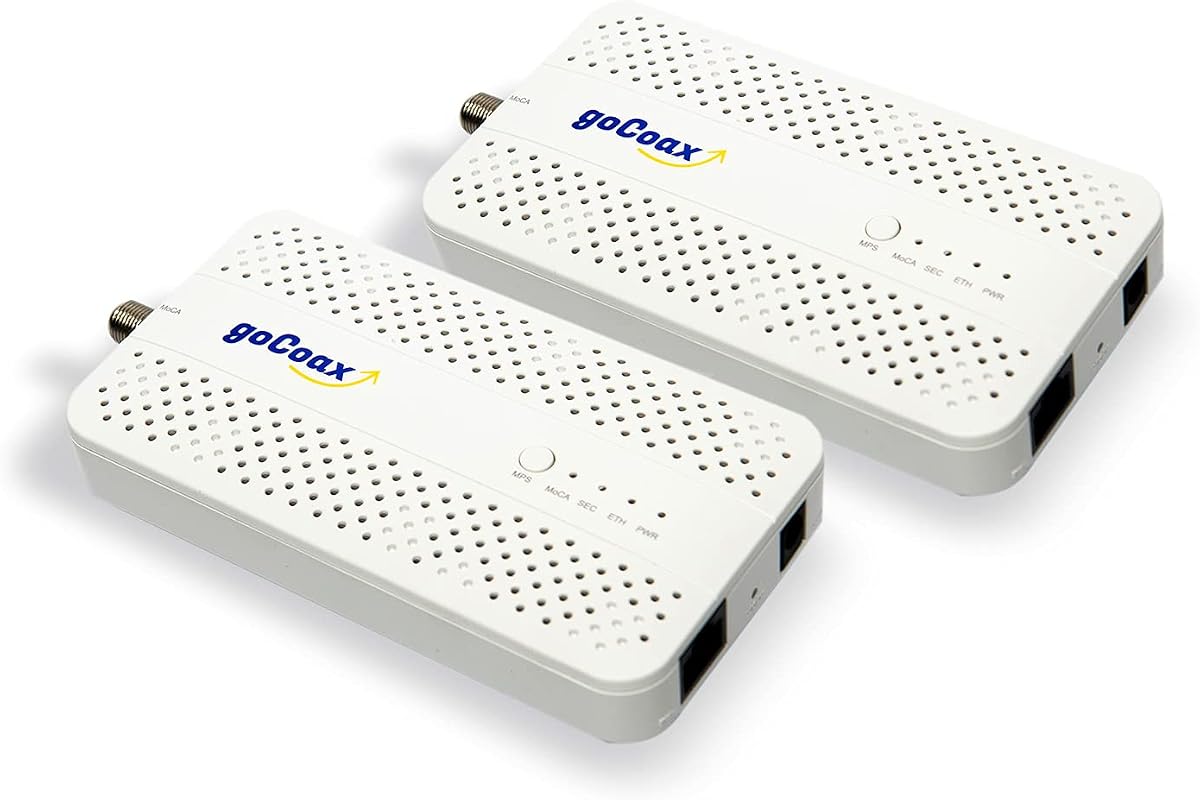
2. goCoax MA2500D – Best Budget Coax to Ethernet Adapter
The goCoax MA2500D offers excellent value with 2.5Gbps speeds and under 3ms latency. It is perfect for competitive gaming and smooth streaming experiences.
Pros
- Very low latency
- Affordable price
- Complete kit included
- Compatible with many ISPs
Cons
- No MoCA filter included
- Satellite TV not supported
We may earn a commission when you buy through this link, at no additional cost to you.
Its plug and play setup requires no configuration. Users get coax and ethernet cables in the box ready to connect immediately.
A separate PoE filter is recommended for security. This minor addition ensures optimal performance on shared networks.
Budget conscious buyers will appreciate this reliable solution. It delivers premium performance without a high price tag.
Gaming Focus Design
Engineered to minimize lag for serious gamers on a budget.
ISP Compatibility
Works with most major cable providers for broad usability.
We may earn a commission when you buy through this link, at no additional cost to you.
3. TRENDnet TMO-313C2K – Best Premium Coax to Ethernet Adapter
The TRENDnet TMO-313C2K stands out with its high reliability and government compliance. It offers a stable 2.5Gbps connection in a compact form.
Pros
- High reliability rating
- Compliant with government standards
- Compact size
- Multiple node support
Cons
- Price higher than some
- Satellite services excluded
We may earn a commission when you buy through this link, at no additional cost to you.
Its design suits professional and home offices equally. The low latency benefits streaming and voice calls consistently.
Government and enterprise users value the compliance features. This ensures adherence to strict procurement requirements.
For those prioritizing stability and compliance this adapter is excellent. It justifies the cost with robust performance.
Government Compliance
NDAA and TAA compliance meets strict procurement standards.
Compact Efficiency
Small design fits easily in tight spaces without overheating.
We may earn a commission when you buy through this link, at no additional cost to you.
4. Kiwee KB-M3-02 – Dual Ports for More Devices
The Kiwee KB-M3-02 features dual 2.5GbE ports allowing multiple devices to connect at full speed. This is rare among coax adapters and adds significant flexibility.
Pros
- Two ports per adapter
- High speed performance
- Complete installation kit
- Future proof design
Cons
- May conflict with some modems
- Requires coax wiring
We may earn a commission when you buy through this link, at no additional cost to you.
It supports seamless gaming and 4K streaming without interference. The kit includes all cables for a hassle-free setup.
DOCSIS 3.1 modems may cause disconnects. Users should verify compatibility with their ISP beforehand.
This adapter suits households needing multiple wired connections. It future proofs your network effectively.
Dual Port Advantage
Connect two devices at full speed from one coax outlet.
Complete Kit Value
Includes cables and splitters for immediate installation.
We may earn a commission when you buy through this link, at no additional cost to you.
5. Hitron HTEM5 – Reliable Extension Adapter
The Hitron HTEM5 delivers 2.5 Gbps speeds by extending existing networks through coax cables. It is not a modem but a pure adapter for connectivity.
Pros
- Clear instructions
- High speeds
- Good support
- Complete kit
Cons
- Not for satellite
- AT&T fiber incompatible
We may earn a commission when you buy through this link, at no additional cost to you.
Its setup guide helps users verify wiring requirements. This prevents issues related to isolated or satellite disconnected coax.
AT&T Fiber users must avoid this product due to interference. Other ISPs like Verizon Fios work well.
For cable homes needing extra ports this is reliable. It provides straightforward networking without unnecessary features.
Clear Setup Process
Detailed guide helps avoid common wiring errors.
Network Extension
Ideal for extending internet to distant rooms easily.
We may earn a commission when you buy through this link, at no additional cost to you.
6. LNOVISION LongReach – Industrial PoE Solution
The LNOVISION LongReach is a specialized adapter for PoE over coaxial cables. It upgrades analog systems to IP surveillance while using existing wiring.
Pros
- PoE support
- Heat sink design
- Industrial reliability
- Easy plug and play
Cons
- Slower speeds
- Point to point only
We may earn a commission when you buy through this link, at no additional cost to you.
Its industrial design includes a heat sink for reliability. This ensures stable transmission in demanding environments like elevators.
It operates at 100Mbps which is lower than MoCA. But it suits specific CCTV needs effectively.
Choose this for security systems needing power delivery. It offers unique capabilities beyond standard home internet.
PoE Capability
Delivers both data and power over single cable.
Industrial Durability
Built to withstand heavy use in commercial settings.
We may earn a commission when you buy through this link, at no additional cost to you.
7. Nexuslink GCA-1200-KIT – Dark Coax Specialist
The Nexuslink GCA-1200-KIT targets unused dark coax networks to avoid TV conflicts. It delivers 1.2Gbps speeds without interfering with live cable services.
Pros
- Works on dark coax
- No cable TV conflict
- Quick installation
- Secure connection
Cons
- Not for active cable TV
- Slower than MoCA
We may earn a commission when you buy through this link, at no additional cost to you.
Setup is straightforward requiring no expertise. Users can transform dark wiring into fast Ethernet instantly.
It is not compatible with shared cable internet services. This ensures stability for those avoiding signal interference.
Home owners with unused coax can use this effectively. It is a secure alternative for gaming.
Dark Coax Focus
Uses only unused lines to avoid service conflicts.
Installation Simplicity
Plug and play design ensures quick deployment.
We may earn a commission when you buy through this link, at no additional cost to you.
8. MoCA 2.5 Adapter Kit KB-M3-03 – PoE+ Ready
The MoCA 2.5 Adapter Kit KB-M3-03 combines high speed data with PoE+ power. It is perfect for Wi-Fi access points and IP cameras.
Pros
- Power over Ethernet
- High speed support
- Future Wi-Fi ready
- Stable connection
Cons
- Slightly higher cost
- Needs coax outlet
We may earn a commission when you buy through this link, at no additional cost to you.
It ensures devices get both data and power efficiently. This reduces outlet usage and simplifies wiring.
Performance matches MoCA 2.5 standards closely. It supports modern devices without bottlenecks.
Smart home owners will find this highly useful. It bridges networking and power needs seamlessly.
Power Delivery
Supplies 30W power alongside data transmission.
Modern Compatibility
Optimized for Wi-Fi 6E and 7 access points.
We may earn a commission when you buy through this link, at no additional cost to you.
9. TRENDnet TMO-312C – Solid Gigabit Choice
The TRENDnet TMO-312C offers Gigabit Ethernet performance in a compact package. It supports 16 nodes ensuring robust home connectivity.
Pros
- Long warranty
- Support available
- Compact
- Reliable
Cons
- 1Gbps speed limit
- Single port
We may earn a commission when you buy through this link, at no additional cost to you.
Its 3-year manufacturer protection provides peace of mind. Users can rely on consistent support during the warranty period.
The speed caps at 1Gbps but handles daily tasks well. For most users this is sufficient.
This adapter is a safe bet for standard needs. It balances quality and price effectively.
Manufacturer Support
Strong warranty and tech support for buyers.
Stable Performance
Delivers consistent throughput for streaming.
We may earn a commission when you buy through this link, at no additional cost to you.
10. ScreenBeam ECB6200S02 – Add-On Adapter
The ScreenBeam ECB6200S02 is designed as an add-on for existing networks. It offers a carrier-grade reliable solution for 1Gbps speeds.
Pros
- Cost effective
- Carrier grade
- Stable
- 16 nodes
Cons
- Not starter kit
- Older MoCA version
We may earn a commission when you buy through this link, at no additional cost to you.
It pairs with starter kits to expand connectivity. This flexibility makes it cost effective.
MoCA 2.0 is older but still functional for most tasks. Users needing more speed should consider 2.5.
Existing users can expand cheaply with this unit. It suits basic needs well.
Expansion Capability
Adds nodes to existing setups affordably.
Carrier Grade Quality
Built to withstand heavy daily usage.
We may earn a commission when you buy through this link, at no additional cost to you.
Buying Guide – How to Choose the Best Coax to Ethernet Adapter
Selecting the right coax to Ethernet adapter requires understanding your home infrastructure and performance needs.
MoCA Version
The MoCA version defines maximum speed. MoCA 2.5 supports up to 2.5Gbps while MoCA 2.0 tops at 1Gbps. Choosing 2.5 ensures future readiness.
Always prioritize MoCA 2.5 for modern high-speed internet plans.
Ethernet Port Speed
Ensure the adapter has a 2.5GbE port to match MoCA 2.5 speeds. A 1Gbps port will bottleneck the connection.
Check port specs carefully to avoid mismatched bandwidths.
ISP Compatibility
Confirm your ISP supports MoCA. Some providers like AT&T Fiber do not work with these adapters.
Contact support if unsure about network restrictions.
Wiring Requirements
Existing coaxial wiring must be interconnected. Satellite installations may have isolated wiring that won't work.
Verify all outlets connect to the main splitter before buying.
Node Count
Most adapters support up to 16 nodes on a network. This covers most large households.
If you need more nodes check multi-node configurations.
PoE Support
Some models offer Power over Ethernet for cameras or access points. This simplifies cabling needs.
Look for PoE if you have powered devices.
Kit Contents
Full kits include cables and splitters which saves money. Starter kits are better for beginners.
Review what's included to avoid hidden costs.
Warranty
Manufacturers offer different warranty periods. Longer warranties signal confidence in product quality.
Prioritize brands with strong support policies.
How to Use and Care for Your Coax to Ethernet Adapter
Connect one adapter to your router via Ethernet and coax to the wall. Connect the second adapter to your device and coax to another wall outlet.
Ensure all coax connections are tight to avoid signal loss. Loose connectors can cause intermittent connectivity issues.
Regularly update firmware if possible to maintain performance. Check manufacturer sites for any available patches.
Frequently Asked Questions
Do I need a PoE filter?
A PoE filter helps secure the network by preventing signal leakage. It is recommended for optimal performance but not always required.
Can I use these with Satellite TV?
No satellite TV wiring usually isolates coax lines. These adapters require interconnected coax networks to function properly.
Does MoCA interfere with cable internet?
MoCA shares coax but avoids interference using different frequencies. Some modems might conflict though so check compatibility.
How many nodes can one network support?
Most adapters support up to 16 nodes on a single network. This allows extensive coverage in large homes.
What is MoCA 2.5?
MoCA 2.5 is a standard allowing up to 2.5Gbps speeds over coax. It improves latency and bandwidth over older versions.
Is wiring modification needed?
No wiring changes are needed if existing coax is interconnected. Just plug adapters into available outlets for instant setup.
Do these replace my modem?
No these adapters extend existing networks. They require a functioning modem and router to work.
Are coax cables included?
Most starter kits include coax and Ethernet cables. Always check product descriptions to confirm what is provided.
Final Thoughts on Choosing the Best Coax to Ethernet Adapter
The ScreenBeam ECB7250K02 and goCoax MA2500D lead in performance and value respectively. These two cater to diverse user needs effectively.
Prioritize speed and wiring compatibility when selecting. Ensure your ISP supports MoCA to avoid frustration.
Prices change often so verify current offers before buying. This ensures you secure the best deal for your network upgrade.