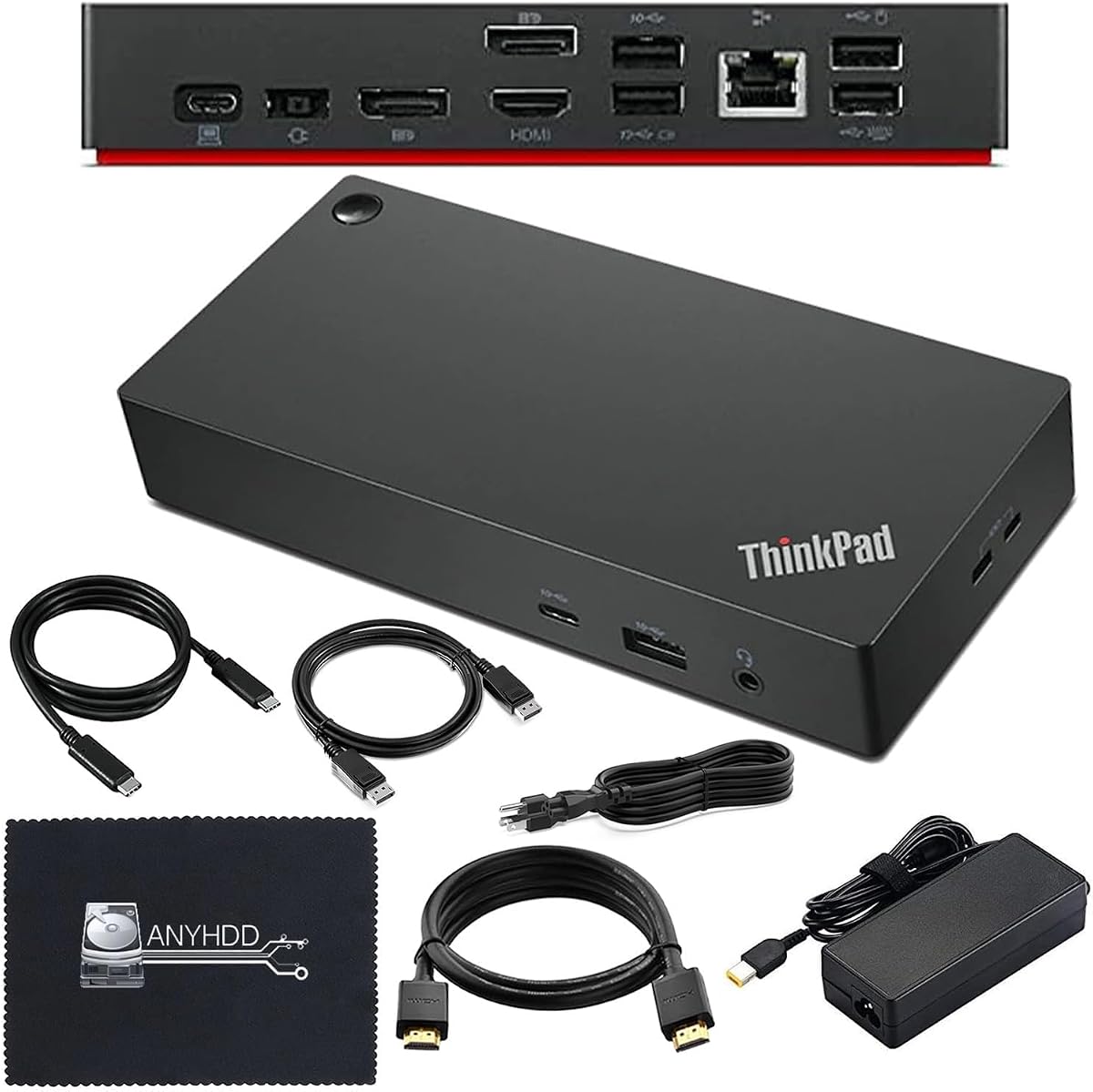
Lenovo Thinkpad Docking Station Dual Monitor
4.6Editor score
Thunderbolt 4 support
90W power adapter included
Multiple HDMI and DP ports
This guide compares the top docking stations for Lenovo Yoga laptops to help you find the perfect hub for connectivity, display, and power needs.
Choosing the right docking station for your Lenovo Yoga laptop can transform your workspace into a highly efficient productivity hub. With the right accessories, you can connect multiple monitors, peripherals, and networks seamlessly.
We evaluated ten top-rated models based on port variety, display support, power delivery, and overall build quality. Each option was selected to meet different professional and travel needs for Yoga users.
Every pick includes key features, pros, cons, and expert insights to help you decide quickly. Please note that product prices and availability may change over time.
4.6Editor score

4.2Editor score
4.3Editor score
The following table compares all ten selected docking stations side by side. This overview helps you quickly identify which model matches your specific port and display requirements.


The Lenovo USB-C Dual Display Travel Dock stands out as a robust connectivity solution for Lenovo Yoga users. Rated highly for its powerful performance, this dock transforms your workspace with dual 4K display support and seven engineered ports for seamless multitasking.
We may earn a commission when you buy through this link, at no additional cost to you.
Its universal compatibility ensures it works with all USB-C laptops, while the optional 135W adapter boosts power delivery to 100W. The Always-On USB port keeps mobile devices charged even when your laptop is disconnected, ensuring your tools are always ready.
While the dock offers great value, you may need to purchase an additional 135W charger for maximum power delivery. Also, it supports only two external displays, which may not suit setups requiring triple monitor configurations.
This dock is ideal for remote professionals who need a portable yet powerful workspace. Its blend of sustainability and performance makes it a top recommendation for Lenovo Yoga users.
Transform your workspace into a visual powerhouse with support for two 4K displays via DP and HDMI ports.
Eco-friendly with 66% post-consumer recycled content in the chassis, setting a new standard for green docks.
We may earn a commission when you buy through this link, at no additional cost to you.
The Lenovo USA ThinkPad Thunderbolt 3 Dock Gen 2 offers extensive connectivity for power users. With dual 4K display capability and 135W power delivery, it supports demanding workloads across multiple monitors.
We may earn a commission when you buy through this link, at no additional cost to you.
Its port selection includes two HDMI, two DisplayPort, and multiple USB 3.1 ports, alongside a dedicated Ethernet connection. The included Thunderbolt 3 cable ensures high-speed data transfer and video output stability.
While robust, this dock is primarily verified for ThinkPad models, so Yoga users must confirm compatibility. Its bulkier design makes it more suitable for desktop use than frequent travel.
Choose this dock if you need maximum port flexibility and reliable dual 4K support for a stationary workstation setup.
Includes 2x HDMI, 2x DisplayPort, and multiple USB 3.1 ports for extensive peripheral connectivity.
Powered by a 135W adapter, ensuring stable energy for laptops and connected devices.
We may earn a commission when you buy through this link, at no additional cost to you.
The Lenovo USB-C 7-in-1 Hub is an excellent companion for travelers. Its slim, compact build allows for easy portability while offering essential connectivity for laptops and legacy devices.
We may earn a commission when you buy through this link, at no additional cost to you.
With HDMI 4K support, three USB-A ports, and dual SD/TF card readers, this hub handles media transfers and displays effortlessly. Power pass-through ensures your notebook charges while connected.
Trade-offs include the lack of an Ethernet port and lower power pass-through limits compared to full docks. However, these are acceptable for mobile users prioritizing size over wired networking.
This hub is perfect for professionals who need reliable connectivity on the go without sacrificing desk space.
Single cable solution unlocks seven ports including HDMI, USB-A, and card readers for versatile use.
Slim build ensures it fits easily in bags and complements modern laptop aesthetics.
We may earn a commission when you buy through this link, at no additional cost to you.
The Lenovo USB-C Slim Travel Dock is a productivity powerhouse for remote professionals. With eight ports, including USB-A and USB-C options, it supports smooth multi-device connections.
We may earn a commission when you buy through this link, at no additional cost to you.
Its 4K at 60Hz display support ensures lag-free visuals for video conferences or creative work. The integrated USB-C cable simplifies setup and enhances durability.
While its power delivery tops at 65W, which may not suit all high-end Yoga models, it remains efficient for most use cases. The dock's eco-friendly design further adds to its appeal.
Opt for this dock if you value compact design, sustainability, and reliable connectivity for daily tasks.
Enjoy high-quality visuals at 4K 60Hz for seamless work and entertainment.
Made with 66% recycled content, combining performance with environmental responsibility.
We may earn a commission when you buy through this link, at no additional cost to you.
This Lenovo Thinkpad Docking Station is a premium solution for users seeking top-tier performance. With Thunderbolt 4 support and 4K display capability, it delivers crisp visuals and fast data transfer.
We may earn a commission when you buy through this link, at no additional cost to you.
The package includes HDMI, DisplayPort, and USB-C cables, plus a microfiber cloth for convenience. Its 90W adapter ensures stable power for your laptop and peripherals.
While expensive, the included accessories and robust build justify the investment for professional setups. Always verify compatibility with your laptop before purchasing.
Choose this dock for a reliable, high-performance workstation that handles demanding tasks with ease.
Next-gen Thunderbolt 4 ensures high-speed connectivity and versatile external device support.
Includes HDMI, DP, USB-C cables and microfiber cloth for immediate setup.
We may earn a commission when you buy through this link, at no additional cost to you.
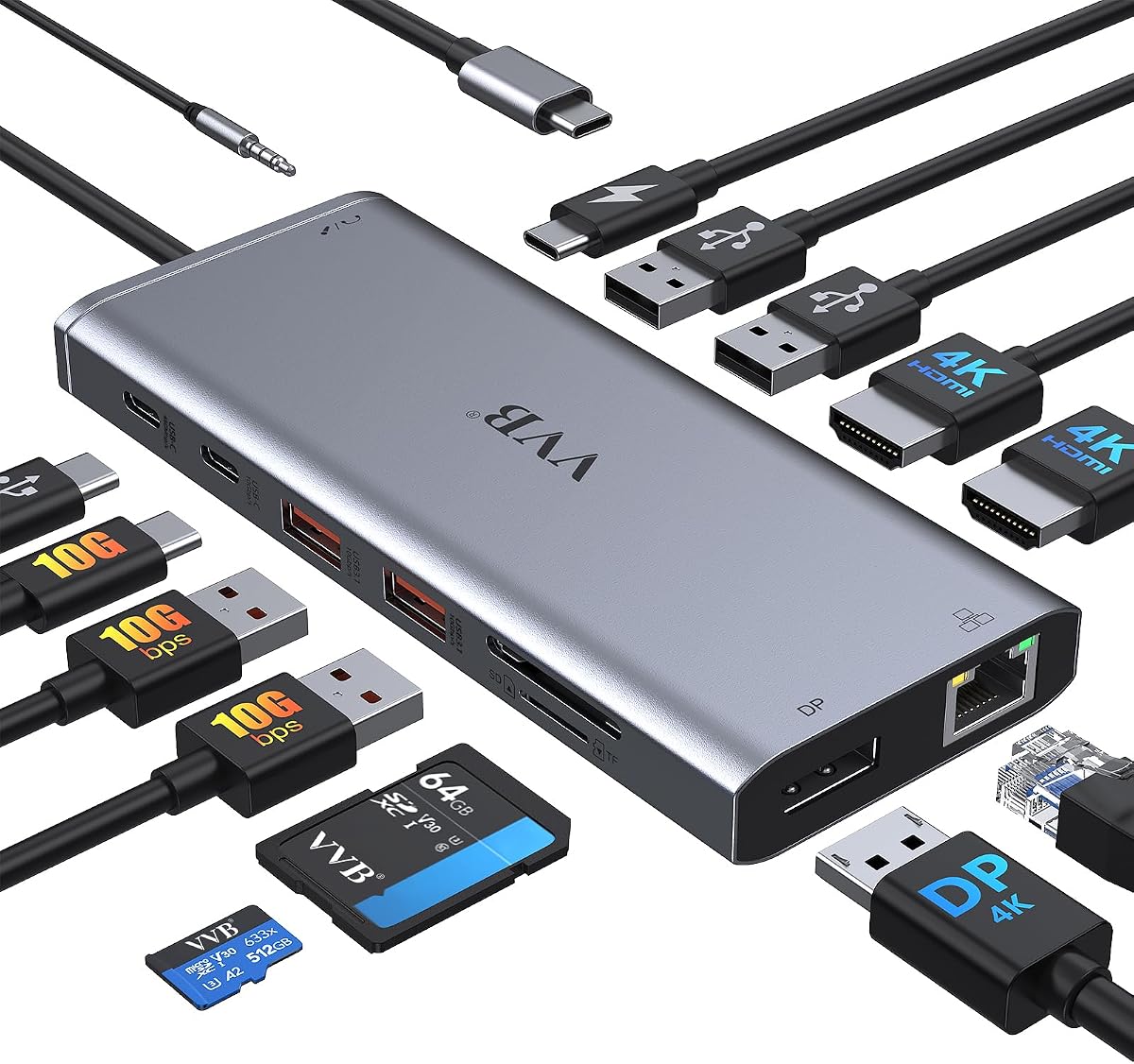
This 14-in-1 docking station offers impressive versatility at a budget-friendly price. With support for triple displays and 100W power delivery, it accommodates various professional needs.
We may earn a commission when you buy through this link, at no additional cost to you.
Features include 10Gbps data transfer, gigabit Ethernet, and multiple USB and SD card ports. It works with most laptops, including Yoga models, that support USB-C video out.
Note that not all USB-C devices are compatible, and resolution may vary with triple monitors. However, the value and feature set make it a strong contender for budget-conscious buyers.
Ideal for users seeking maximum connectivity without breaking the bank.
Support dual or triple monitor setups for expanded workspace productivity.
USB 3.1 ports enable quick file transfers up to 10Gbps.
We may earn a commission when you buy through this link, at no additional cost to you.
The Anker Nano Docking Station features a unique detachable design, combining desktop and travel needs in one device. Its 13-in-1 layout supports triple displays and fast charging.
We may earn a commission when you buy through this link, at no additional cost to you.
The detachable 6-in-1 hub snaps off for portable use, eliminating the need for multiple devices. Included cables and a powerful adapter ensure seamless setup.
The dock only activates when connected to a laptop, and the price is on the higher side. However, its versatility and build quality make it a worthwhile investment.
Recommended for users who want a single solution for home and travel docking.
Detachable hub lets you use the dock at home and on-the-go without buying two devices.
Connect up to three monitors via HDMI and DisplayPort for expanded screen real estate.
We may earn a commission when you buy through this link, at no additional cost to you.
This ThinkPad USB-C Dock Gen 2 provides dependable connectivity for users needing multiple displays. With support for up to three external monitors, it suits multi-tasking workflows.
We may earn a commission when you buy through this link, at no additional cost to you.
Ports include three USB 3.1, HDMI, DisplayPort, and Ethernet. The 90W AC adapter ensures stable power delivery to your laptop.
While video output depends on system capabilities, the dock offers solid performance for business use. Check compatibility carefully to ensure it meets your needs.
A reliable choice for users prioritizing multi-monitor setups and Ethernet connectivity.
Support up to three external monitors for enhanced productivity and multitasking.
90W AC adapter ensures your laptop stays charged during extended use.
We may earn a commission when you buy through this link, at no additional cost to you.
This renewed docking station offers premium features at a competitive price. With a 135W adapter and dual HDMI/DP support, it handles power and display needs effectively.
We may earn a commission when you buy through this link, at no additional cost to you.
The package includes HDMI, DP, and USB-C cables along with a cloth for cleanup. It's internally tested for display, power, and port functionality.
As a renewed product, minor cosmetic wear may exist, but performance is verified. Ensure your notebook hardware is compatible before buying.
Ideal for budget-savvy users seeking high-spec features without buying new.
135W AC adapter delivers stable energy for demanding workstations.
Internally tested to support display, power delivery, and port expansion.
We may earn a commission when you buy through this link, at no additional cost to you.
The Anker 8-in-1 USB C Hub offers massive expansion for laptops with a single USB-C port. It supports dual HDMI outputs with 4K60Hz for crystal clear visuals.
We may earn a commission when you buy through this link, at no additional cost to you.
Power delivery pass-through up to 85W keeps your laptop charged while using peripherals. It works with Windows, ChromeOS, and macOS, though Linux is not supported.
Note that a 100W PD charger is required for pass-through. Despite this, the hub's reliability and performance make it a strong choice for diverse work environments.
Recommended for users needing a compact yet powerful multi-port solution.
Stream or mirror to two displays at 4K60Hz for immersive viewing.
Supports Windows, ChromeOS, and macOS for broad user adoption.
We may earn a commission when you buy through this link, at no additional cost to you.
Selecting the right docking station involves balancing port needs, display support, and power delivery with your specific usage patterns.
Ensure the dock offers enough USB-A and USB-C ports for your peripherals. Check that it supports USB-C video out and Power Delivery for your Yoga model.
Match port types to your devices and verify compatibility with your laptop's Thunderbolt or USB-C generation.
If you use external monitors, confirm the dock supports dual or triple display setups at your desired resolution such as 4K.
Higher refresh rates like 60Hz improve visual smoothness during work or media consumption.
Choose a dock with Power Delivery matching your laptop's wattage to ensure adequate charging while peripherals are connected.
Look for options that supply at least 65W to 100W for most Yoga models.
Ports like USB 3.1 or Thunderbolt 3 provide faster data transfer rates for external drives and accessories.
Ethernet ports ensure stable wired network connections when Wi-Fi is unavailable.
Travelers may prefer slim hubs with integrated cables, while desktop users can choose larger docks with more ports.
Consider the dock's footprint and durability based on your usage environment.
Check if the dock includes a sufficient power adapter or if you need to buy one separately to avoid extra costs.
Included adapters simplify setup and ensure correct wattage is delivered.
Look for docks offering warranties to protect against defects and ensure long-term reliability.
Manufacturer support and customer reviews can guide you toward trustworthy products.
Balance your budget with required features. Basic hubs may suffice for light users, while premium docks suit power users.
Investing in a reliable dock can improve workflow efficiency and device longevity.
Connect the dock to your Yoga laptop via the USB-C cable first before plugging in external devices.
Plug in the power adapter if your dock requires external power, then connect peripherals such as monitors and mice.
Regularly dust ports and avoid bending cables excessively to maintain performance and longevity.
Yes, many docking stations support dual or even triple external monitors. Ensure the dock supports HDMI or DisplayPort outputs and your laptop's video capabilities.
It depends on the model. Some include sufficient power adapters while others require you to buy a high-wattage USB-C charger separately.
Yes, docks with Power Delivery pass-through will charge your laptop while connected. Verify the wattage meets your laptop's needs.
Most are, but compatibility depends on Thunderbolt support and Power Delivery features. Always confirm specifications match your laptop model.
Many docks include gigabit Ethernet ports for stable wired internet connections. Check the ports listed in the product details.
Visit the manufacturer's support website to download the latest firmware or driver updates for your specific dock model.
You may need adapters or converters. Ensure your dock supports the display interfaces your monitors use.
Thunderbolt docks offer faster data speeds and video bandwidth than standard USB-C docks. Check your laptop's ports to choose accordingly.
The Lenovo USB-C Dual Display Travel Dock, Thinkpad Docking Station Dual Monitor, and the 14-in-1 USB C Laptop Docking Station top our list for their balance of performance and value.
Prioritize your needs for display count, power delivery, and port variety when deciding. A suitable dock greatly enhances productivity and comfort.
Prices and availability change so check current listings before purchasing to ensure you get the best deal.