
GE BigEZ OneTouch Big Button Universal TV Remote
4.3Editor score
Backlit buttons for visibility
Color coded volume and channel keys
Supports five major TV brands
This guide compares the easiest TV remotes for seniors featuring big buttons simple layouts and universal compatibility to help elderly users enjoy television
Finding the right television remote can be a significant challenge for older adults who face vision or dexterity issues. A well designed remote simplifies daily routines and ensures independence for seniors living alone or with family members who prioritize ease of use above all else.
We evaluated ten top rated universal remotes based on button size, layout simplicity, compatibility with major brands, and user feedback from caregivers and elderly users. Our selection process focused on models that eliminate clutter while maintaining essential functions like power volume and channel control.
Each product in this list offers unique benefits tailored to different needs such as backlit keys for low light or color coded buttons for those with visual impairments. Please note that prices and availability change frequently so verify current details before purchasing any recommended item.
4.3Editor score
4.2Editor score

4.4Editor score
The following table provides a side by side overview of all ten remotes evaluated in this guide highlighting their key specifications and unique features to help you make an informed decision quickly.


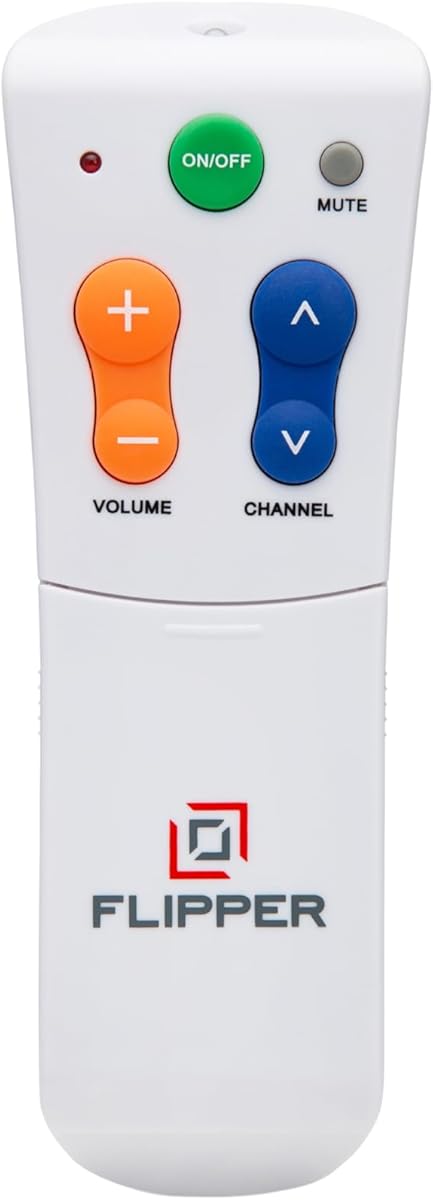
The Flipper remote stands out as a top choice for seniors needing simplicity and clear visual cues. With a rating of 4.2 stars it has received praise for its focused design that strips away unnecessary complexity found on standard remotes.
We may earn a commission when you buy through this link, at no additional cost to you.
Its main strength lies in the large color coded buttons that allow users to quickly identify power volume and channel controls without confusion. The hidden buttons slide out for customization which keeps the main interface clean and manageable for those with cognitive challenges.
While it cannot navigate streaming apps like Netflix which limits its utility for modern smart TV setups it excels at traditional broadcast and cable control. This trade-off is acceptable for users who primarily watch cable channels and want to avoid frustrating app navigation.
Caregivers and families should consider this remote for elderly members with dementia or low vision who need a reliable way to control their main viewing experience without stress. It offers peace of mind through its straightforward and intuitive design.
Color coding helps users with declining vision distinguish between functions instantly reducing the time spent searching for the right button.
The slide to reveal buttons allow caregivers to set favorite channels without cluttering the main face with dozens of unused options.
We may earn a commission when you buy through this link, at no additional cost to you.
The EZclicker Big Button Universal TV Remote is designed with tactile feedback to assist those with limited dexterity or vision issues. It holds a solid 4.2 rating among users who appreciate its physical design that makes pressing buttons more satisfying and precise.
We may earn a commission when you buy through this link, at no additional cost to you.
This remote features an extra large enter button and big universal controls that cater specifically to seniors who struggle with small keys. The programming process is straightforward requiring users to hold specific buttons until the volume changes which simplifies initial setup.
A limitation to note is that it does not support cable boxes or streaming sticks like Firestick or Roku limiting it to TV control only. This makes it ideal for simpler setups but less versatile for households with multiple devices requiring control.
For seniors who need a compact and lightweight remote that fits comfortably in their hand this model offers a comfortable and accessible experience. It is a thoughtful gift that simplifies daily television use effectively.
Tactile feedback helps users confirm button presses without looking which reduces errors and frustration during daily use.
The hold to program method eliminates the need for complex codes making it accessible for tech hesitant users.
We may earn a commission when you buy through this link, at no additional cost to you.
The GE BigEZ OneTouch remote offers an affordable entry point for seniors needing a simpler viewing experience. With a 4.3 rating it delivers reliable performance and key features like backlighting that enhance usability in darker rooms.
We may earn a commission when you buy through this link, at no additional cost to you.
Its vision friendly features include extra large white keys and color coded volume and channel buttons which help those with visual impairments navigate easily. The setup process is straightforward allowing users to press a brand button and power on to start using it.
While it only supports five TV brands including Samsung LG and Sony it covers the most common devices found in many homes. Users should verify their TV brand matches the preset options to ensure compatibility before purchasing.
Budget conscious buyers will appreciate the combination of essential features and low cost without sacrificing quality. The included technical support adds value by assisting with any setup issues that may arise after purchase.
Backlit buttons illuminate when pressed or in low light helping users find the right button quickly at night.
Access to US based technical support provides a safety net for users who may need help programming the remote.
We may earn a commission when you buy through this link, at no additional cost to you.
This EZclicker remote focuses on simplicity and compact size making it ideal for seniors who need a device that is easy to store and carry. It shares many features with the other EZclicker model but offers a slightly smaller form factor.
We may earn a commission when you buy through this link, at no additional cost to you.
The big button design provides tactile feedback and clear visibility for users with limited dexterity or vision. Programming remains easy with the same hold to program method that simplifies setup without requiring complex codes or manual entry.
It is not compatible with streaming sticks or cable boxes which means it is best suited for households where the TV is the primary source of entertainment. This limitation ensures a cleaner interface without extra buttons that could confuse the user.
Families looking for a small and simple remote to replace a cluttered original should consider this model. It prioritizes comfort and accessibility while maintaining functionality for basic TV control needs.
The smaller size makes it easier for arthritic hands to grip and reduces the chance of dropping it accidentally.
Removing non essential buttons helps users focus on what matters and reduces cognitive load during use.
We may earn a commission when you buy through this link, at no additional cost to you.
This remote offers one of the simplest experiences by eliminating the need for any programming or setup. Users can insert batteries and start using it immediately which removes a common barrier for seniors setting up a new remote.
We may earn a commission when you buy through this link, at no additional cost to you.
It is compatible with a wide range of TV brands including Samsung LG Vizio and Sony ensuring it fits many household setups. The 4.4 rating suggests it performs well across different models and provides reliable control for everyday viewing.
A notable feature is the excellent after sale service which includes a 90-day replacement warranty. This gives buyers confidence that they can reach out if issues arise without worrying about long term reliability or support costs.
For those who want a hassle-free solution that works right away this remote is an excellent choice. It prioritizes immediate usability and reliability making it a strong candidate for gift giving or quick replacements.
Skipping the programming step ensures that seniors can start using their TV immediately without help from family members.
A 90-day warranty provides a safety net for users who may encounter issues during the initial use period.
We may earn a commission when you buy through this link, at no additional cost to you.
This remote is designed with a clear layout that prioritizes visibility and ease of use for seniors with low vision. It has earned a 4.4 rating from users who appreciate its focus on traditional TV control without unnecessary complications.
We may earn a commission when you buy through this link, at no additional cost to you.
The large buttons make it easy to see and press reducing the risk of misclicks which can be frustrating for those with dexterity challenges. The ergonomic design ensures it feels comfortable in the hand during extended use.
It is not compatible with cable boxes or DVD players which keeps the device simple and focused on the television itself. This limitation is acceptable for users who primarily watch live TV and do not need additional device control.
Families looking for a reliable and durable remote that promotes independence for elderly members should consider this option. It strikes a good balance between functionality and simplicity for everyday home entertainment.
A simple layout reduces cognitive load by presenting only the essential controls needed for daily viewing.
Lightweight construction and an ergonomic shape prevent hand fatigue during long viewing sessions.
We may earn a commission when you buy through this link, at no additional cost to you.
The Philips BigEZ OneTouch remote offers an innovative setup process that allows users to program their TV with just one button press. While it holds a 3.8 rating it provides unique features that cater to seniors who value simplicity and visibility.
We may earn a commission when you buy through this link, at no additional cost to you.
It includes a fully backlit keypad and color coded buttons that make it easier to navigate in low light. The support for multiple devices means users can control their TV and a cable box from the same remote without swapping devices.
The lower rating may indicate some users found it less reliable or harder to use for certain brands. However the technical support and patent-pending design suggest that Philips is committed to improving the user experience over time.
For those who prioritize setup speed and backlighting this remote is worth considering. It provides a solid option for households with compatible TV brands and a need for multi-device control.
One button programming eliminates complex code entry making the initial setup process faster and easier for seniors.
Fully illuminated buttons ensure that keys remain visible and accessible even in darkened living rooms.
We may earn a commission when you buy through this link, at no additional cost to you.
This remote offers a basic design focused on simplicity and affordability for seniors who need a straightforward replacement. While it has a lower rating of 3.0 it provides essential functions without unnecessary complexity.
We may earn a commission when you buy through this link, at no additional cost to you.
The large buttons and clear layout make it easier for users to find the right controls without confusion. It works with most major TV brands ensuring compatibility with a wide range of devices found in homes today.
It does not support streaming devices or cable boxes which keeps the interface clean but limits its versatility. For users who only need to control their television this simplification is often a benefit rather than a drawback.
Budget buyers looking for a functional remote without extra features might find this model suitable. It serves as a simple replacement for standard remotes that have become too complex for daily use.
Sticking to core functions like power volume and channel ensures users are not overwhelmed by extra options.
Large buttons with clear markings help those with poor vision locate controls quickly and independently.
We may earn a commission when you buy through this link, at no additional cost to you.
This remote stands out for its self illuminating keys which stay lit for 30 seconds after pressing making it ideal for those with low vision. It holds a 4.4 rating and is specifically designed for Samsung TVs ensuring reliable performance.
We may earn a commission when you buy through this link, at no additional cost to you.
The package includes a protective silicone cover and a mount hook which adds extra value by protecting the remote and keeping it accessible. The ergonomic design and high-strength ABS plastic make it durable and comfortable to hold for long periods.
Since it is designed specifically for Samsung TVs it does not work with other brands or streaming devices. This specialization ensures perfect compatibility and eliminates the need for complex programming which can be confusing for seniors.
For Samsung owners who want a premium experience with added convenience features this remote is an excellent choice. The protective accessories and backlit design provide extra support for users with limited mobility or vision.
Buttons that light up when pressed provide immediate visual feedback and help users navigate in dark rooms.
The included cover and hook protect the remote from damage and keep it from getting lost in couch cushions.
We may earn a commission when you buy through this link, at no additional cost to you.
The Anderic RR1004 features glow in the dark keys that make it easy to find in low light settings. With a 4.0 rating it is well suited for seniors and care facilities where simplicity is key.
We may earn a commission when you buy through this link, at no additional cost to you.
Its learning function allows users to copy commands from their existing IR remote which can help retain familiarity with certain buttons. This feature offers flexibility for those who want to keep specific functions without learning a new interface.
It does not work with RF or Bluetooth systems which limits compatibility to traditional IR TVs. Users should check their existing remote system to ensure it matches before purchasing this model.
For assisted living environments or households with simple IR TV setups this remote offers a reliable and easy to use solution. The minimalist design ensures that only essential controls are available reducing confusion significantly.
Key visibility in dark rooms helps seniors locate the remote quickly without needing a light source.
Copying buttons from an old remote helps users maintain familiarity with functions they already know.
We may earn a commission when you buy through this link, at no additional cost to you.
Choosing the right remote involves considering several factors that impact usability for elderly individuals. This guide breaks down the most important aspects to evaluate before purchasing.
Large buttons are essential for seniors who may have limited dexterity or vision. Look for remotes with extra large keys that provide tactile feedback so users can feel when they press a button without looking.
Prioritize remotes with clearly marked large buttons to minimize errors and frustration during daily use.
Ensure the remote is compatible with your specific TV brand and any additional devices like cable boxes or streaming sticks. Some models only work with TVs while others control multiple devices which can reduce clutter.
Check the compatibility list to confirm the remote works with your TV brand and any satellite or cable boxes you use regularly.
A simple layout reduces cognitive load by removing unnecessary buttons. Remotes with fewer keys help users focus on essential functions like power volume and channel controls without getting overwhelmed by complex menus.
Choose a model with a clean face that only includes the buttons you need for everyday viewing.
Visual aids like backlighting or color coded buttons help users with low vision navigate the remote easily. Backlit keys illuminate when pressed while color coding helps distinguish between different functions at a glance.
Look for remotes with backlit or color coded keys to enhance visibility in low light conditions.
Remotes that require minimal setup or no programming are ideal for seniors who may struggle with technical steps. Models with one-touch setup or plug-and-play functionality eliminate the need for complex code entry.
Opt for remotes that offer simple or automatic setup to avoid frustrating programming processes.
A lightweight and ergonomic design ensures the remote is comfortable to hold for extended periods. Seniors with arthritis or weak grip strength benefit from remotes that are small and easy to manipulate.
Select a remote with a balanced shape and light weight to ensure comfort during regular use.
Consider how often the remote needs new batteries and whether they are included. AAA and AA batteries are standard but some models may have different requirements or battery life expectations.
Check battery type and expected life to ensure the remote remains functional for long periods without interruption.
Some remotes come with protective covers or cases that prevent damage from drops or spills. This is particularly useful for seniors who may be clumsy or live in busy household environments.
Look for remotes that include protective accessories or have a durable build to withstand daily wear and tear.
Insert the batteries correctly following the polarity marks inside the battery compartment to ensure the remote powers on. Keep the batteries clean and replace them if the buttons stop responding to maintain consistent performance.
Program the remote according to the instructions provided which may involve pressing specific button combinations or using a setup code. For models with one-touch setup simply press the brand button and power on to begin.
Clean the remote regularly with a soft dry cloth to remove dust and oils that can build up on the buttons. Avoid using harsh chemicals or water directly on the device to prevent internal damage.
Most of the remotes listed are designed for traditional TV control and do not support streaming apps. Some models may control power and volume on smart TVs but navigating apps requires their original remote.
Remotes without codes usually use a setup method like pressing a hold combination or selecting a brand. Follow the user manual for specific steps as programming processes vary by model and brand.
Some remotes can control cable boxes while others are designed for TVs only. Check the product details to see if it supports your specific cable or satellite provider before purchasing.
Most simplified remotes do not allow button customization to keep them easy to use. A few models offer hidden buttons or learning functions that let you add essential commands for specific needs.
Most remotes use standard AA or AAA batteries but this can vary by model. Always check the product specifications to know which battery type and how many are required for operation.
Remotes with simple layouts and clear buttons are ideal for users with dementia as they reduce confusion. Models like the Flipper specifically focus on simplicity to help users maintain independence.
First check that batteries are installed correctly and try reprogramming the device. If issues persist contact the manufacturer support team or return the remote if it is under warranty.
Voice control remotes exist but may add complexity for some seniors. Many simplified remotes omit voice features to keep the interface straightforward and avoid requiring voice commands to work.
We have reviewed ten remotes tailored for seniors ranging from budget friendly options to premium models with special features. The Flipper stands out for its simplified design while the GE BigEZ offers excellent value with backlighting.
When choosing prioritize features like button size compatibility and ease of programming to ensure the remote meets the specific needs of the user. Simplicity often wins over extra functions for elderly individuals who want reliable control.
Remember that prices and availability can change so verify details on the product pages before buying. These remotes provide an affordable way to improve daily viewing experiences and independence for seniors.