
TECKNET Ergonomic Mouse, 4800 DPI Wireless Bluetooth Vertical
4.4Editor score
Adjustable DPI up to 4800 for precision tasks
Silent click design for quiet office environments
Connects to three devices via Bluetooth and USB
Discover the top ergonomic mice for wrist pain designed to reduce strain and improve posture during long computer sessions. This guide compares features
Finding the right ergonomic mouse can transform your workday by reducing strain on your wrist and forearm. Vertical designs promote a natural handshake position that helps prevent repetitive stress injuries while maintaining productivity throughout long hours of computer use.
We compared ten top-rated wireless and rechargeable models based on ergonomic design, connectivity options, battery life, and user feedback. Each product was evaluated for comfort, precision, and suitability for different hand sizes and operating systems to ensure you find the perfect match.
Each pick highlights specific strengths such as silent clicks, multi-device switching, or premium build quality to help you decide quickly. Please note that prices and availability change frequently so check the latest details before making your final purchase decision online.
4.4Editor score

4.4Editor score

4.4Editor score
This side-by-side comparison highlights key specifications across all ten models to help you identify the best fit for your specific needs and workspace requirements.



The Logitech Lift Vertical Ergonomic Wireless Mouse is a top choice for those seeking relief from wrist discomfort during long work hours. With a 57 degree vertical angle, it promotes a natural handshake position that reduces forearm twist and muscle strain effectively throughout the day.
We may earn a commission when you buy through this link, at no additional cost to you.
Its design has been tested and approved by leading ergonomists ensuring it meets strict comfort standards. The softly textured grip and snug thumb rest provide level-above coziness making it easy to relax into focus without distraction or hand fatigue.
While it is an excellent ergonomic solution the mouse is optimized for small to medium right hands which might be a consideration for larger hand sizes. Additionally the premium price reflects the high build quality and certified ergonomic testing it undergoes before release.
This mouse is ideal for professionals who prioritize health and productivity equally. If you spend many hours typing or navigating digital interfaces the Lift offers a reliable certified path to reducing repetitive strain and maintaining comfort over time.
The vertical shape helps wrists feel like ahhh at work by aligning the forearm and wrist in a more natural posture.
Connect via Bluetooth Low Energy or Logi Bolt USB to Windows macOS and other systems with up to two years battery life.
We may earn a commission when you buy through this link, at no additional cost to you.
The Anker 2.4G Wireless Ergonomic Mouse offers a scientifically designed structure that promotes a healthy neutral wrist and arm position. It is an affordable option that helps reduce strain and amplify productivity for users seeking relief from wrist discomfort.
We may earn a commission when you buy through this link, at no additional cost to you.
Its optical tracking technology ensures smooth and precise movement across various surfaces which is essential for both work and leisure activities. The inclusion of next and previous buttons makes it especially convenient for internet enthusiasts who browse frequently throughout the day.
Users should note that key click sounds are unavoidable with this model which might be a drawback in quiet environments. Additionally it relies on AAA batteries that are not included so you will need to purchase them separately for immediate use.
For budget-conscious buyers looking for solid ergonomic support the Anker mouse is a practical choice. It delivers reliable performance and includes a comprehensive warranty so you can use it with confidence during your daily computing tasks.
800 1200 and 1600 DPI resolution optical tracking technology offers more sensitivity than standard computer mice for diverse surfaces.
Transitions into power-saving mode after 8 minutes of inactivity and disconnects power until woken by a button press.
We may earn a commission when you buy through this link, at no additional cost to you.
The TECKNET Ergonomic Mouse delivers impressive performance with 6 adjustable DPI levels and a silent click design that works well in quiet environments. It offers strong connectivity options including Bluetooth and USB to support multiple devices efficiently.
We may earn a commission when you buy through this link, at no additional cost to you.
Its ergonomic design places your palm at a near-vertical angle reducing pressure and pain caused by prolonged inverted mouse usage. This feature makes it a compelling budget choice for right-handed users seeking comfort without sacrificing functionality.
Keep in mind that this mouse requires two AAA batteries which are not included and side buttons may not work with macOS systems. Additionally while the click is silent some function buttons may still produce noise during use.
For users wanting a cost-effective ergonomic solution with versatile connectivity the TECKNET mouse is an excellent pick. It balances comfort precision and value well making it a smart investment for daily computing tasks.
Nearly silent clicks help avoid disturbances to others ensuring your work or study remains undisturbed in shared spaces.
Connect to three devices via Bluetooth 5.0 or 2.4GHz USB modes to improve work efficiency across platforms.
We may earn a commission when you buy through this link, at no additional cost to you.
The UGREEN Ergonomic Wireless Mouse is designed with a natural vertical handshake position that reduces wrist rotation and muscle strain. It is a versatile choice for users with larger hands or anyone who spends long hours on the computer seeking comfort.
We may earn a commission when you buy through this link, at no additional cost to you.
Its smooth and quiet tracking is supported by durable Teflon glide pads that ensure effortless movement and reduced surface friction. The quiet-click buttons help keep your workspace peaceful making it suitable for shared offices or home environments.
Although it connects via 2.4G wireless or Bluetooth the device relies on one AA battery for power. While this is common for budget models some users may prefer rechargeable options for extended use without replacements.
This mouse is well-suited for those needing a reliable quiet ergonomic tool without breaking the bank. It balances productivity and comfort effectively making it a strong contender for daily office or home work setups.
The practical 5-button layout lets you navigate browse and work more efficiently every day with quiet-click buttons.
Fully compatible with Windows macOS Linux ChromeOS and Android making it a versatile choice for various devices.
We may earn a commission when you buy through this link, at no additional cost to you.
The ProtoArc EM11 NL is designed specifically for hand lengths under 7.5 inches offering a natural grip that reduces wrist strain. Its rechargeable battery means you do not need to replace disposable batteries making it convenient for daily use.
We may earn a commission when you buy through this link, at no additional cost to you.
The ergonomic vertical design keeps your wrist naturally straight putting your forearm and wrist in a relaxed position. This alignment helps reduce discomfort and strain potentially improving productivity compared to a standard mouse over time.
Users should expect a learning curve of one to two weeks to get used to the shape which is common with vertical mice. Additionally the buttons are not programmable and some forward back buttons may not be compatible with Mac systems.
For small to medium hand users seeking a rechargeable ergonomic option this mouse delivers solid comfort and value. It is a practical choice for those willing to adapt to vertical positioning for long-term wrist health benefits.
Built-in 500mAh Li-Ion battery can be conveniently recharged using the included Type-C cable.
The vertical design keeps your wrist naturally straight which can reduce discomfort and strain during use.
We may earn a commission when you buy through this link, at no additional cost to you.
The Lekvey Ergonomic Mouse encourages healthy neutral wrist and arm positions for smoother movement and less overall strain. It features a high-capacity rechargeable battery that provides over 150 hours of continuous use on a single charge.
We may earn a commission when you buy through this link, at no additional cost to you.
Its page back and forward functionality buttons provide convenience when browsing which is a useful feature for web users. The device is widely compatible with Windows and Mac systems and requires no drivers for plug and play setup.
This model does not support Bluetooth connectivity relying solely on a USB receiver for connection. Additionally the DPI levels are fixed at three options which may limit fine-tuning for different tasks compared to other models.
If you prioritize long battery life and ease of setup the Lekvey mouse is a solid ergonomic choice. It reduces pain effectively and includes a strong warranty making it a dependable tool for daily computer use.
Enjoy over 150 hours of continuous use on a single charge avoiding the need to buy disposable batteries.
One nano USB receiver at the bottom of the mouse offers plug and play convenience without drivers.
We may earn a commission when you buy through this link, at no additional cost to you.
The TECKNET Ergonomic Mouse features a 52 degree vertical angle designed for all-day comfort and strain reduction. Its silent click technology reduces noise significantly making it ideal for libraries or quiet open offices.
We may earn a commission when you buy through this link, at no additional cost to you.
It supports versatile Bluetooth and USB connectivity options ensuring simple pairing and smooth switching between devices. The built-in rechargeable battery eliminates the need for extra disposable batteries and lasts for extended use on a single charge.
While it boasts high precision tracking and durable build the forward and back buttons are not available on Mac systems. This limitation may affect cross-platform users who need consistent functionality across different operating systems.
For those seeking a quiet durable ergonomic mouse with strong battery performance this model stands out. It delivers on comfort and efficiency making it a recommended choice for professionals who value focus and health.
Whisper-quiet clicks reduce noise by 99% allowing precision without distraction in quiet environments.
6 adjustable DPI levels up to 4800 ensure smooth tracking on various surfaces for every task.
We may earn a commission when you buy through this link, at no additional cost to you.
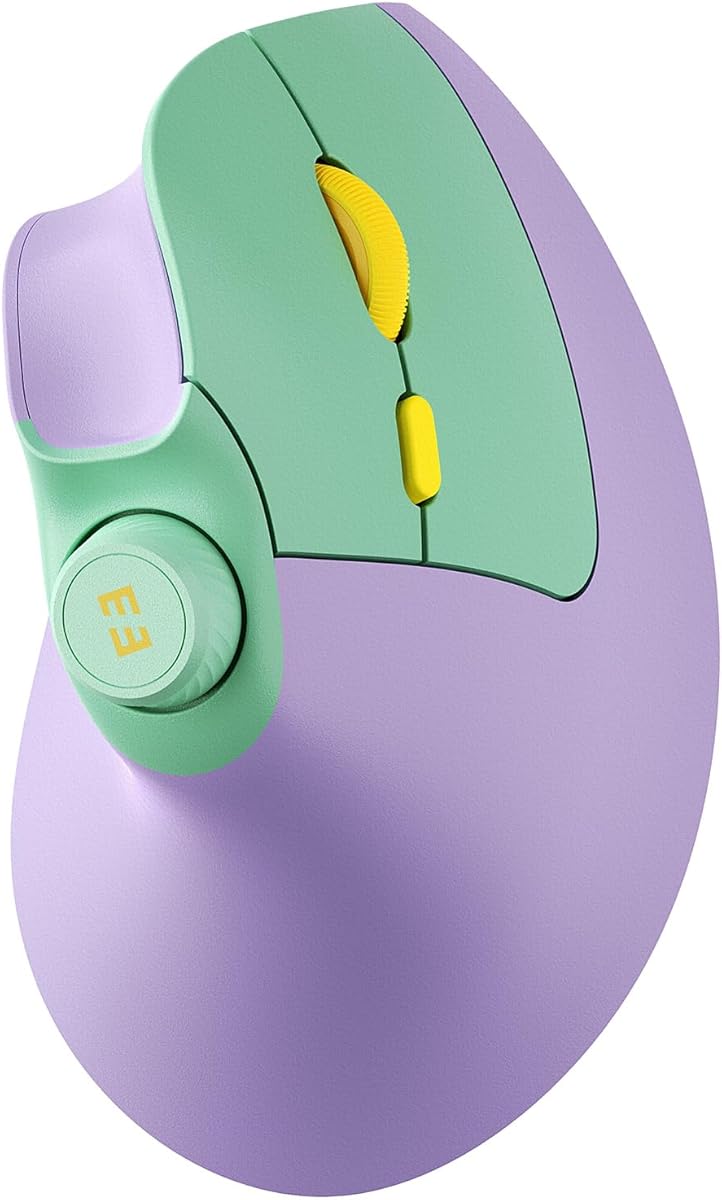
The seenda MOU-302 is designed to promote a natural handshake grip and reduce pressure during long computer use. It stands out with a built-in volume control button that lets you manage audio directly without switching windows.
We may earn a commission when you buy through this link, at no additional cost to you.
Silent clicks prevent distractions making it suitable for shared offices or late-night sessions. The mouse can connect to three devices simultaneously and offers a long-lasting rechargeable battery for reliable use anywhere.
While the volume knob is a unique and efficient feature the DPI adjustments are limited compared to higher-end models. Users needing extensive sensitivity tuning may find this a slight drawback for specialized precision tasks.
For streamers remote workers or anyone needing quick audio control this ergonomic mouse is a practical tool. It balances unique functionality with essential comfort features making it a strong choice for daily use.
Pause play and adjust music volume directly from the mouse without switching windows for better efficiency.
Noiseless clicks prevent distractions while adjustable DPI ensures smooth control for office or casual gaming.
We may earn a commission when you buy through this link, at no additional cost to you.
The Logitech MX Vertical is a premium ergonomic design tested by leading ergonomists to improve posture and reduce muscle strain. Its 57 degree vertical angle reduces pressure on your wrist while your thumb rests comfortably on a dedicated thumb rest.
We may earn a commission when you buy through this link, at no additional cost to you.
It features an advanced optical sensor that results in less hand movement and fatigue compared to standard mice. The cursor speed switch instantly adjusts DPI speed and accuracy which helps streamline workflows without manual settings adjustments.
The premium price reflects its high-quality build and certified design but it is worth the investment for those with chronic wrist pain. Note that in some wireless versions the USB receiver may be provided inside or along with the mouse.
If you seek top-tier ergonomics with proven performance the MX Vertical is a reliable choice. It helps lower muscle strain and reduce wrist pressure making it ideal for professionals spending hours at the computer.
Natural handshake position reduces muscular activity by 10 percent compared to a standard mouse without performance loss.
The cursor speed switch instantly adjusts DPI speed and accuracy with the touch of a button for efficiency.
We may earn a commission when you buy through this link, at no additional cost to you.
The TECKNET 2.4G Wireless Ergonomic Vertical Mouse uses a scientific 60 degree vertical grip to let you hold it like a natural handshake. It cuts wrist strain and pain at the source while offering programmable buttons to speed up workflows.
We may earn a commission when you buy through this link, at no additional cost to you.
Its left and right buttons feature a silent design ensuring a quiet and comfortable workspace without distracting noise. The mouse pairs easily with a reliable USB-A receiver and offers adjustable DPI for various tasks.
Users may experience resistance at first as the brain and muscles adapt to correcting years of poor posture. The company recommends using it alongside an old mouse for a few days to ease into the transition smoothly.
For those seeking a straightforward rechargeable ergonomic tool with useful shortcuts this model delivers practical comfort. It is a smart investment in wrist health and productivity for daily office or home use.
6 programmable buttons and 5 adjustable DPI levels speed up your workflow and reduce repetitive click fatigue.
Reliable 2.4GHz wireless technology provides a stable interference-free connection of up to 10 meters.
We may earn a commission when you buy through this link, at no additional cost to you.
Choosing the right ergonomic mouse involves considering several factors to ensure comfort and productivity. Here are the key aspects to evaluate before making your purchase.
Different models are optimized for small medium or large hands. Measure your hand length and check manufacturer recommendations to ensure a snug fit that supports your natural grip without causing fatigue.
Always verify the recommended hand size before purchasing to maximize comfort and ergonomic benefits.
Decide whether you prefer Bluetooth or a USB receiver. Bluetooth offers cleaner setups and multi-device support while USB receivers provide stable plug-and-play connectivity without pairing delays.
Choose the connection type that fits your workspace and device setup for seamless operation.
Some mice use replaceable AAA batteries while others offer rechargeable built-in batteries. Rechargeable models reduce waste and long-term costs but require charging cables and periods of downtime.
Consider your usage habits and convenience preferences when selecting between disposable and rechargeable options.
Adjustable DPI allows you to switch between high precision for detailed work and faster speeds for general navigation. Look for mice with multiple DPI levels to adapt to different tasks easily.
Ensure the mouse offers sufficient DPI settings to match your workflow needs.
If you work in a shared or quiet environment silent click buttons can help reduce distractions. Check product descriptions for silent click claims to ensure the mouse operates quietly.
Prioritize quiet operation if you value a peaceful workspace.
Extra buttons for page navigation or customization can boost productivity. However note that some buttons may not be compatible with all operating systems like macOS.
Check button compatibility with your OS to avoid missing functionality.
A robust warranty indicates manufacturer confidence and protects your investment. Look for warranties of at least one to three years for peace of mind.
Always review warranty terms to understand what is covered in case of defects.
Durable materials such as high-quality plastics or recycled components contribute to the mouse's longevity. Textured grips also enhance comfort and control during extended use.
Select a model with quality materials that feel comfortable and sturdy in your hand.
Position the mouse so your forearm and wrist remain straight in a natural handshake posture. This alignment reduces pressure on the carpal tunnel and prevents twisting movements that cause strain.
Take short breaks to stretch your hands and wrists every hour. Even ergonomic devices work best when paired with healthy habits that promote circulation and flexibility.
Clean the surface regularly with a dry cloth to remove dust and oils. Store the mouse in a dry place to protect electronic components and extend its lifespan.
Yes vertical mice promote a natural handshake posture that reduces forearm twist and muscle strain. This design helps alleviate discomfort for many users suffering from carpal tunnel or repetitive strain injuries.
Most users need one to two weeks to adjust to the new shape and feel. During this time it is common to feel slight awkwardness but comfort improves with consistent use.
Many vertical mice are compatible with Mac systems but some side buttons may not function correctly. Always check product specifications for macOS compatibility before purchasing.
Higher DPI settings allow for smaller hand movements which can reduce strain. Start with a moderate level and increase until you find a balance between precision and comfort.
Most rechargeable models include the battery and charging cable. However disposable battery models often do not include batteries so check product details before buying.
Yes several ergonomic mice offer high DPI and fast tracking suitable for gaming. However precise gaming may require testing to ensure the vertical shape feels comfortable during intense sessions.
Wireless models use stable Bluetooth or USB receiver technology for reliable performance. Ensure your device supports the required connectivity to avoid connection issues during use.
Most models are plug-and-play without software but some offer customization for buttons and DPI. Check if drivers are needed for your operating system before setup.
The ten options above cover a range of needs from budget-friendly to premium models. Whether you prefer silent clicks rechargeable batteries or high DPI precision there is a suitable ergonomic mouse for every user.
Prioritize features that align with your hand size and workflow to ensure long-term comfort. Investing in quality now can prevent future pain and improve daily productivity significantly.
Remember to check current prices and availability before buying since offers and stock change often. Finding the right mouse can make a big difference in how you feel after long computer sessions.