
HDMI Splitter 1 in 3 Out 4K HDMI Distributor
4.3Editor score
4K@30Hz mirror display support
Solid aluminum alloy build quality
Plug and play with USB-C power
This guide compares the top 10 HDMI splitter for 3 monitors to help you choose the best multi-screen setup for work and entertainment.
Finding the right HDMI splitter for 3 monitors can transform your workspace into a productivity powerhouse. Whether you need to expand your desktop for trading or mirror content for presentations, the right device ensures stable, high-resolution output across all screens without lag or signal loss.
We evaluated ten top-rated models based on resolution support, build quality, compatibility with modern graphics cards, and ease of setup. Our analysis covers both DisplayPort to HDMI hubs and standard HDMI splitters, highlighting key differences in extended mode support versus mirroring only configurations.
Each pick in this guide includes detailed specs, pros and cons, and real-world usage notes to help you decide quickly. Prices and availability change frequently, so verify the current listing before purchasing to ensure you get the exact model and warranty terms listed here.
4.3Editor score

4.4Editor score

4.2Editor score
This side-by-side comparison highlights the key specifications and limitations of each model to help you match the right splitter to your specific monitor setup and source device requirements.



The UANTIN DisplayPort to HDMI Splitter ranks first due to its ability to support extended desktop mode rather than just mirroring. It allows users to expand a single DP signal across three HDMI monitors simultaneously. This device supports up to 4K@60Hz resolution on all screens, making it ideal for design work and multitasking.
We may earn a commission when you buy through this link, at no additional cost to you.
Its standout quality lies in the high-bandwidth requirements it meets. The splitter needs a graphics card supporting at least 18Gbps to function correctly. The all-aluminum casing ensures the unit stays cool during long sessions. The gold-plated interfaces reduce signal interference effectively. It includes a power cable to ensure stability.
Users should note that this is a one-way conversion device. You cannot reverse the signal flow from HDMI to DisplayPort. Mac OS users will find this device incompatible since it relies on MST which macOS does not support in this context. It works best with Windows systems.
If you need a triple-screen setup from a single DP port for productivity, this is the top choice. It bridges the gap between older DP ports and modern HDMI monitors. Always check your graphics card specifications before purchasing to ensure bandwidth compatibility. The robust build justifies the price point.
Extended mode allows you to drag windows across screens instead of mirroring content. This increases workspace productivity significantly for trading or coding.
Ensure your GPU supports DisplayPort 1.2 or higher with sufficient bandwidth. Without this the device may not output to all three monitors.
We may earn a commission when you buy through this link, at no additional cost to you.
The NEWCARE HDMI Splitter offers a budget-friendly solution for users who need to mirror content across three screens. It supports stunning UHD 4K@60Hz resolution which is rare at this price. The package includes a 4ft HDMI cable and power adapter. This makes it ready to use right out of the box.
We may earn a commission when you buy through this link, at no additional cost to you.
Its key strength is the auto downscaler feature. This allows 4K and 1080P displays to work simultaneously under the same refresh rate. It supports high-quality audio formats like Dolby Atmos and DTS-HD. It is great for home theater setups where synchronization is vital.
However, it strictly mirrors content. You cannot extend your desktop with this device. It also does not support connecting external audio devices to the splitter itself. Setup requires connecting displays before the power adapter to prevent blackouts.
This is perfect for retail displays or conference rooms where identical content is needed on multiple screens. It saves money while delivering high resolution. Always ensure your source device supports the correct HDCP version. The included accessories add significant value.
The splitter ensures synchronized audio and video on all displays. This is crucial for smooth playback without lag or timing issues.
Connect your displays first then the source device. Finally plug in the power adapter to ensure a stable signal without flickering.
We may earn a commission when you buy through this link, at no additional cost to you.
This premium splitter supports the latest HDMI 2.1 standard with up to 8K@60Hz resolution. It is built for users with next-gen consoles or high-end PCs. It supports Variable Refresh Rate and 4K@120Hz which is ideal for gaming. The EDID management is more flexible than most competitors.
We may earn a commission when you buy through this link, at no additional cost to you.
Its standout quality is the bandwidth capacity. With 48Gbps it handles massive data streams without compression issues. It supports advanced audio like Dolby Atmos and DTS-HD. The switching modes allow you to set specific outputs for different needs. This future-proofs your setup.
The trade-off is the price and complexity. You need a source capable of high bandwidth to see the benefits. It also does not extend screens. It is purely for mirroring high-fidelity content. If your devices are older you may not utilize all features.
Gamers and professionals needing high refresh rates should consider this model. It ensures you are ready for future display upgrades. Check your source device capabilities before buying. It is a powerful tool for high-performance setups.
Support for VRR and 120Hz means smoother gameplay on compatible screens. This reduces screen tearing and latency significantly.
Flexible EDID switching helps match the best output signal to your displays. This improves compatibility with mixed resolution screens.
We may earn a commission when you buy through this link, at no additional cost to you.
The THANDBLE DisplayPort to HDMI Splitter is a robust hub for extending three monitors from one DP port. It supports 4K@60Hz resolution on all connected displays simultaneously. It works best with desktop PCs equipped with dedicated graphics cards. The build quality focuses on heat dissipation and stability.
We may earn a commission when you buy through this link, at no additional cost to you.
Its key strength is enabling true triple-screen productivity. You can extend your taskbar and apps across all three screens. It includes integrated aluminum alloy to handle heat efficiently. The gold-plated ports ensure stable signal transmission over long periods.
Users should be aware of its limitations. Integrated GPUs often only support mirroring. macOS users cannot use this device effectively due to MST support issues. You must connect a 5V power supply for operation. It is not compatible with docking stations.
This model is excellent for office workers needing expanded desktop space. It turns a single DP output into a full workstation setup. Ensure your Windows version and drivers are up to date. It is a reliable tool for multitasking.
True extended mode allows for multiple windows across three screens. This is essential for complex data analysis or coding tasks.
The device requires a dedicated 5V power connection. This ensures consistent performance without relying on USB power alone.
We may earn a commission when you buy through this link, at no additional cost to you.
This HDMI distributor ensures real-time mirroring of content across three screens without signal loss. It supports 4K@30Hz which is sufficient for most business presentations. The aluminum alloy casing handles heat well during continuous operation. It includes independent LED indicators for each output port.
We may earn a commission when you buy through this link, at no additional cost to you.
Its standout quality is the stability and high rating. Users report consistent performance without flickering. It works with many devices including PS5 and laptops. The compact size saves desk space while maintaining performance. It is designed for 24/7 operation.
The main trade-off is the refresh rate at 4K. It caps at 30Hz which may feel less smooth for fast video. Also note the power adapter is not included. You must connect the USB-C power cable separately to avoid signal drops.
This is ideal for retail or office screens showing identical content. It is reliable for long-term commercial use. Always use high-quality HDMI cables to support the resolution. Check power needs before setup to ensure reliability.
Support for 3D Blu-ray and deep color ensures rich visuals. This enhances the viewing experience for media content.
The company provides 24/7 support and a 12-month warranty. This offers peace of mind for commercial or daily use.
We may earn a commission when you buy through this link, at no additional cost to you.
This splitter duplicates a single source to three screens with zero latency. Every monitor shows the exact same image in real time. It is ideal for trading desks or retail walls where consistency is key. The aluminum alloy build keeps the unit cool during long use.
We may earn a commission when you buy through this link, at no additional cost to you.
Its key strength is the zero lag sync. There are no dropped frames or flickering between displays. It supports 36-bit deep color for rich visuals. LED indicators show active ports to simplify troubleshooting. It works seamlessly with laptops and consoles.
Users must connect the power cable as required. The output port does not support audio connections directly. You need separate audio solutions for sound. It is strictly for video mirroring. Setup is simple but power is mandatory.
Choose this for reliable synchronization in high-traffic environments. It handles commercial use effectively. Ensure you have the correct power adapter on hand. The build quality ensures longevity in office settings.
Zero lag ensures every screen updates at the same instant. This is vital for live data trading or synchronized advertising.
The metal casing blocks interference and handles heat well. This protects against signal dropouts in busy offices.
We may earn a commission when you buy through this link, at no additional cost to you.
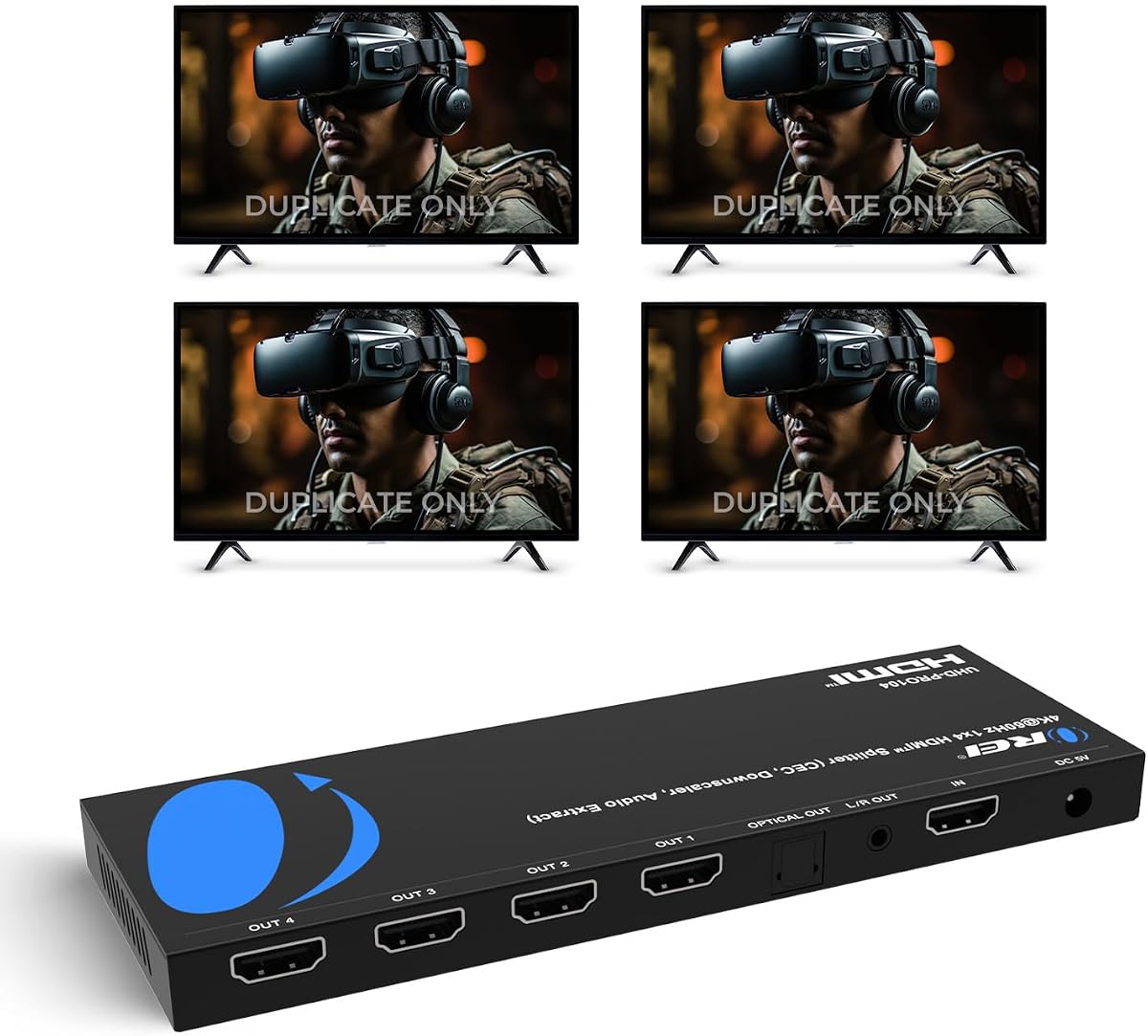
This OREI splitter delivers 4K@60Hz across four HDMI outputs simultaneously. It is great for presentations or multi-monitor setups needing extra display. The heavy-duty metal enclosure ensures heat dissipation and durability. It supports wide audio formats including Dolby TrueHD.
We may earn a commission when you buy through this link, at no additional cost to you.
Its standout quality is the high bandwidth stability. It uses 18Gbps to ensure clean video quality without artifacts. The metal housing is robust enough for 24/7 operation. It includes EDID support for stable signal communication.
Note it provides four outputs instead of three. This is ideal for larger setups. It does not support extended mode. The warranty options vary depending on item condition. Setup is simple without drivers.
Buy this if you need four displays for mirroring. It balances performance and reliability. Always use high-quality cables for optimal range. It works well for retail or classroom use.
Support for DTS-HD and Dolby TrueHD delivers immersive sound. This is great for home theater or AV setups.
Built-in EDID ensures devices agree on resolution and timing. This prevents black screens or signal drops.
We may earn a commission when you buy through this link, at no additional cost to you.
This advanced splitter splits one HDMI source to four displays with audio extraction. It supports HDR10+ and Dolby Vision for vivid colors. It automatically downscales 4K signals to 1080p if needed. This is excellent for mixed resolution displays.
We may earn a commission when you buy through this link, at no additional cost to you.
Its key strength is the audio extraction feature. You can output optical or analog audio separately. This is useful for soundbars or AV receivers. It handles HDR effectively to boost contrast and brightness. The build is premium and reliable.
It is more complex and expensive than standard units. Not everyone needs HDR support or audio extraction. You must manage CEC settings for best results. It is better for high-end home theater or conference rooms.
Choose this for advanced AV setups with mixed screens. It offers flexibility in video and audio handling. Ensure your TV supports the necessary HDMI standards. It is a powerful tool for enthusiasts.
Audio extraction lets you connect separate speakers easily. This enhances sound without relying on TV speakers.
Downscaling allows different screen types to work together. This prevents compatibility issues in large setups.
We may earn a commission when you buy through this link, at no additional cost to you.
This MT-ViKI splitter supports long distance transmission up to 100ft. It is perfect for security monitoring or large conference rooms. The built-in amplifier ensures signal stability. It includes a power adapter to prevent flickering.
We may earn a commission when you buy through this link, at no additional cost to you.
Its standout quality is the cascading support. You can connect even more screens by chaining units. The metal housing protects against EMI interference. It supports deep color for crisp visuals on TVs.
Note it does not support extended mode. It is purely for mirroring. It cannot connect audio devices directly. Setup requires checking resolution compatibility. It is reliable for commercial setups.
Choose this for long distance or large display needs. It ensures signal reaches the far screens. Always use the included power adapter. It is durable for 24/7 commercial environments.
Built-in amplifier boosts signal to prevent drops. This works well for large venue presentations.
Metal casing blocks interference and heat. This ensures performance in high traffic rooms.
We may earn a commission when you buy through this link, at no additional cost to you.
UGREEN offers a reliable 1 in 4 out splitter with wide compatibility. It supports 4K@60Hz and 3D content. The EDID control helps avoid black screens or flickering. It works with almost all HDMI sources from consoles to PCs.
We may earn a commission when you buy through this link, at no additional cost to you.
Its key strength is the device compatibility. It handles Blu-ray players and gaming systems well. Output 1 supports CEC for advanced control. USB power ensures stable transmission. It is compact and easy to set up.
Users must keep it connected to power at all times. It has four outputs which may be more than needed. Ensure displays support the correct resolution to avoid black screens. It is versatile for home use.
Choose this for flexibility across many devices. It is reliable for daily mirroring needs. Always connect it to a power source. It is a solid choice for general entertainment or work.
CEC support on Output 1 lets you control devices. This simplifies remote usage for home setups.
USB power ensures stable video transmission. Keeping it connected prevents any drop or loss.
We may earn a commission when you buy through this link, at no additional cost to you.
Selecting the right splitter depends on your source ports resolution needs and whether you require extended screens or mirroring.
Identify whether your source uses HDMI or DisplayPort. DisplayPort hubs are necessary for extended desktop mode on Windows while HDMI splitters only mirror content.
Choose based on your graphics card output to ensure correct compatibility and functionality.
Check the maximum resolution and refresh rate supported by the splitter. Look for 4K@60Hz for smooth video or 4K@30Hz for budget setups.
Higher bandwidth ensures you get the full quality your monitors can display.
Decide if you need to extend your desktop or mirror it. Extended mode requires MST and specific GPU support while mirroring works on most devices.
This is the most critical functional choice for your productivity needs.
Most high performance splitters require an external power source. Ensure you have the correct adapter and cable to prevent signal loss.
External power stabilizes the signal and prevents flickering during long use.
Look for aluminum or metal housings which provide better heat dissipation. Quality builds prevent overheating and extend the device lifespan.
Durable materials also protect against signal interference in crowded environments.
Verify that the splitter supports your specific devices like consoles PCs or laptops. Check HDCP versions to avoid copy protection issues.
Wide compatibility ensures the splitter works across all your existing gear.
Some splitters include audio extraction or pass through. If you need sound control ensure the device supports your audio format.
Standard HDMI splitters often pass audio but may not extract it separately.
Consider the number of output ports required and included cables. Extra ports offer flexibility for future expansion or backups.
Ensure included cables meet length and quality standards for your setup.
First connect the source device to the splitter input using a high quality HDMI or DisplayPort cable. Then connect each monitor to the splitter output ports ensuring all are secure.
Connect the external power adapter to the splitter if required and plug it into a power source. This ensures the device receives enough power for stable signal transmission.
After setup check your monitor settings to adjust resolution and refresh rates. Verify that all screens show the correct content without flickering or black screens.
Most standard HDMI splitters only mirror content. To extend a desktop across multiple screens you typically need a DisplayPort MST hub. Check the product details carefully for extended mode support before purchasing to avoid limitations.
Many high performance splitters require an external power adapter to maintain signal stability. USB power alone may not be sufficient for higher resolutions. Always use the recommended adapter to prevent flickering or loss.
Yes most splitters support gaming consoles like PS5 or Xbox. Ensure the splitter supports the console resolution and refresh rate for best performance. Check HDCP compatibility to avoid playback issues on your console.
Ensure all cables are securely connected and powered on. Check that the source device supports the required resolution. Update graphics drivers and try adjusting EDID settings if your splitter supports them for better compatibility.
High quality splitters maintain the original signal without noticeable degradation. Poor quality units might cause artifacts or reduced refresh rates. Always choose models with adequate bandwidth to match your source and monitor specs for best results.
HDMI 2.1 splitters support higher bandwidth and features like 8K or 4K@120Hz while 2.0 caps at 4K@60Hz. Choose based on your source device capabilities and whether you need advanced features like VRR for gaming.
Yes but check if your laptop supports the required output mode. Integrated graphics may limit extended displays to mirroring. Ensure you have the correct adapter and external power for stable operation with laptops.
Try connecting displays directly to the source to isolate the issue. Replace cables with high quality certified ones. Ensure the splitter receives adequate power. If issues persist reset the EDID on the device if supported.
We have reviewed ten top options covering extended mode and mirroring for various needs. The UANTIN DisplayPort hub leads for productivity while the NEWCARE and UGREEN models offer budget friendly mirroring solutions.
Prioritize your resolution requirements and input type before buying. Extended mode demands specific hardware while mirroring is more flexible. Consider future needs like higher refresh rates when selecting bandwidth.
Prices and availability change so check the current listing before purchase. Verify warranty terms and return policies to ensure you get the exact model listed here. Happy multi-monitor setup.