Redragon K521
4.4Editor score
Rainbow LED backlighting
Anti-ghosting keys
Multimedia function keys
This guide compares the top 10 best keyboard for Rainbow Six Siege in 2026, evaluating speed, durability, and macro support to help you dominate ranked matches.
Finding the right keyboard for Rainbow Six Siege can significantly impact your performance in intense tactical matches. Players need fast response times, reliable key inputs, and comfortable ergonomics to execute quick strategies. This guide reviews the top ten options available today to help you find the perfect fit.
We evaluated each product based on switch type, build quality, lighting features, and overall durability. Our analysis includes detailed specifications and user feedback to ensure you understand what makes each model stand out. Whether you prefer mechanical precision or budget-friendly alternatives, there is something here for every gamer.
Each pick in this list highlights specific strengths that align with the demands of competitive gaming. You will see pros and cons alongside detailed descriptions to make an informed decision. Please note that product availability and pricing may change, so verify details before purchasing.
4.4Editor score

4.6Editor score

4.6Editor score
The following table provides a side-by-side comparison of all ten keyboards reviewed in this guide. It highlights key specifications such as switch type, layout size, and connectivity options to help you quickly identify which model suits your setup and playstyle best.


The Logitech G413 TKL SE stands out as a top choice for players seeking reliability without breaking the bank. With a high user rating, this keyboard delivers consistent performance during intense Siege sessions. Its tactile switches ensure every command registers accurately, which is crucial for tactical gameplay.
We may earn a commission when you buy through this link, at no additional cost to you.
One of the strongest features is the use of PBT keycaps, which are more durable than standard ABS plastic. This means the legends won't fade even after hours of daily use. The brushed aluminum top case provides a rigid structure that prevents flexing during rapid key presses, ensuring a solid typing experience.
While the lack of RGB customization might be a downside for some, the clean white LED lighting maintains a professional look. The absence of dedicated software simplifies setup but limits macro programming options. These trade-offs are acceptable for users who prioritize hardware quality over aesthetic flexibility.
This keyboard is ideal for gamers who want a straightforward, high-performance mechanical board. If you value durability and tactile feedback over colorful lights, the G413 TKL SE is a strong recommendation. It offers excellent value for money and fits well in most competitive setups.
PBT material resists shine and wear better than standard plastic, keeping keys looking new.
Removing the number pad frees up desk space for wider mouse movements during aiming.
We may earn a commission when you buy through this link, at no additional cost to you.
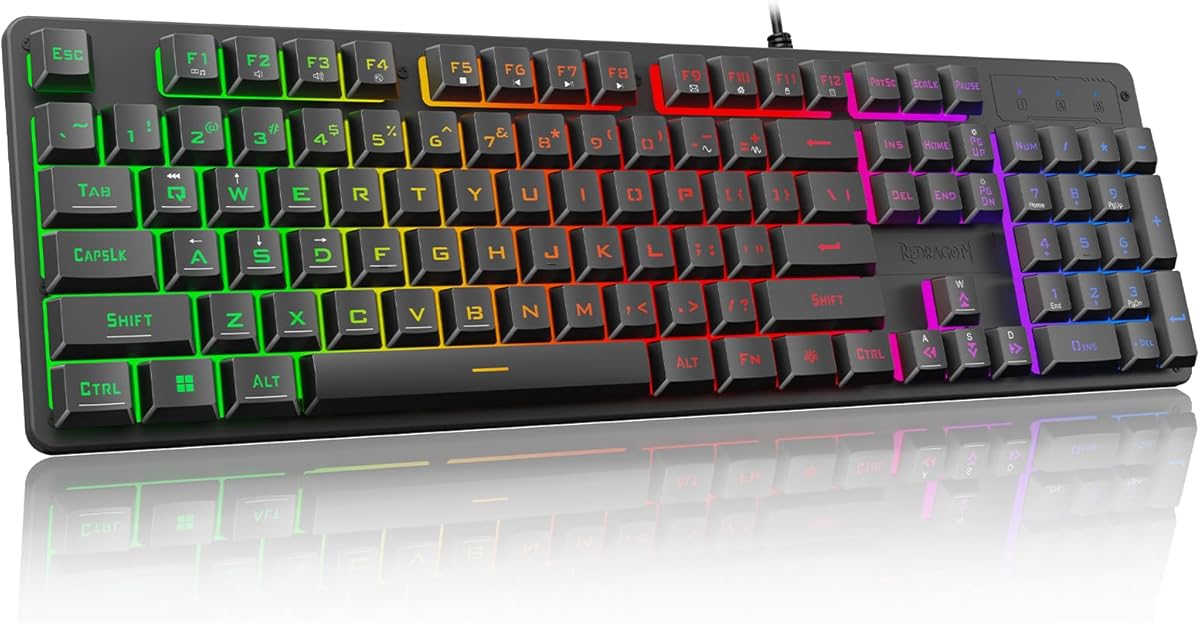
The Redragon K521 offers an accessible entry point for gamers on a tight budget. Despite its low cost, it performs well enough for casual and competitive play. Users appreciate the mechanical-like feel that mimics higher-end keyboards without the hefty price tag.
We may earn a commission when you buy through this link, at no additional cost to you.
Its rainbow LED backlighting creates a vibrant atmosphere that many players enjoy during night sessions. The anti-ghosting feature ensures that multiple key presses are registered simultaneously, which is essential for complex game moves. Additionally, the dedicated multimedia keys allow quick access to volume and playback controls.
However, the switches are not true mechanical, which means they may not last as long as premium options. The plastic construction is functional but lacks the heft of metal-backed boards. These limitations are minor considering the incredibly low price it offers.
For students or budget-conscious gamers, this keyboard is a practical choice. It provides the essential features needed to play Siege effectively without overspending. If you prioritize value over long-term durability, the K521 is a solid starting point.
Mimics the tactile experience of mechanical switches at a fraction of the usual cost.
Works seamlessly with PC, Mac, and consoles for flexible gaming setups.
We may earn a commission when you buy through this link, at no additional cost to you.
The ASUS ROG Strix Scope II 96 represents the pinnacle of gaming keyboard engineering for those who want the best. It combines wireless freedom with the performance of wired connections. The tri-mode connectivity ensures you can switch between devices effortlessly while maintaining high-speed response times.
We may earn a commission when you buy through this link, at no additional cost to you.
One of its standout features is the hot-swappable design, allowing users to change switches without soldering. This flexibility means you can tailor the keyboard to your exact preference over time. The inclusion of PBT keycaps adds durability and a premium texture that resists wear from frequent use.
While the cost is significantly higher than budget options, the build quality justifies the investment for serious gamers. The software dependency might be a hurdle for some, but it unlocks deep customization. These trade-offs are acceptable for users seeking top-tier performance and adaptability.
If you are looking for a high-end keyboard that grows with your needs, this is the one to choose. It offers a blend of style, function, and longevity that few others match. For competitive players who demand excellence, the ROG Strix Scope II 96 is unmatched.
Low-latency wireless tech ensures no lag compared to wired mechanical keyboards.
Swap switches easily to change feel without needing a soldering iron.
We may earn a commission when you buy through this link, at no additional cost to you.
The Corsair K55 RGB PRO is designed for gamers who need functionality without a steep price. It offers six dedicated macro keys that can be programmed for complex in-game actions. The IP42 spill resistance provides peace of mind against accidental drinks during intense sessions.
We may earn a commission when you buy through this link, at no additional cost to you.
RGB lighting can be customized using iCUE software to create dynamic effects or match your setup. The detachable palm rest adds comfort for long periods of use, reducing hand strain. Media keys allow quick adjustments without pausing gameplay, keeping you focused on the match.
While membrane switches lack the crisp feel of mechanical ones, they are quiet and cost-effective. Reliance on software for macro setup might complicate things for non-tech users. These limitations are balanced by its durability and user-friendly features.
This keyboard is a great choice for casual gamers or those new to RGB customization. It offers enough features to enhance your experience without overwhelming you. If you value comfort and spill protection, the K55 RGB PRO is worth considering.
IP42 rating guards against minor spills and dust, extending keyboard lifespan.
Assign complex commands to single keys for faster strategic execution in Siege.
We may earn a commission when you buy through this link, at no additional cost to you.
The SteelSeries Apex 3 is tailored for gamers who need a quiet keyboard that doesn't disturb others. Its whisper-quiet switches reduce noise significantly, making it perfect for shared spaces. The IP32 water-resistant coating protects against accidental spills effectively.
We may earn a commission when you buy through this link, at no additional cost to you.
Ten zones of RGB illumination allow for vibrant visual effects that enhance your gaming atmosphere. The included magnetic wrist rest provides support for extended gaming sessions, improving comfort. Dedicated multimedia controls make it easy to manage music and volume during breaks.
While it lacks the tactile feedback of mechanical keys, the smooth press is reliable for daily use. The software offers basic customization but lacks advanced macro features. These are acceptable trade-offs for the focus on quiet operation and durability.
If you live in a shared environment, this keyboard is an ideal solution. It balances functionality with noise reduction to keep you focused. For those prioritizing comfort and quiet, the Apex 3 is a strong contender.
Switches are designed to be nearly silent, ideal for apartments or dorms.
Protects against liquid spills to ensure longevity in messy gaming environments.
We may earn a commission when you buy through this link, at no additional cost to you.
The Razer Ornata V3 offers a sleek look with low-profile keys that reduce hand strain. Its mecha-membrane switches blend the quiet feel of membrane with the precision of mechanical. UV-coated keycaps resist wear, keeping legends sharp even after extensive use.
We may earn a commission when you buy through this link, at no additional cost to you.
The magnetic wrist rest attaches securely, offering support for wrists during long matches. Backlit media keys provide convenient access to controls without interrupting gameplay. This combination ensures you can focus on winning matches rather than equipment issues.
However, the lack of true mechanical switches may not satisfy players seeking tactile feedback. Customization options are limited compared to higher-end Razer products. These are minor compromises for the portability and comfort offered by this design.
This keyboard suits gamers who prefer a slim profile and quiet typing. It is a stylish addition to modern setups without demanding much desk space. If ergonomics and looks are priorities, the Ornata V3 is a compelling choice.
Shorter travel distance reduces finger strain during long gaming sessions.
Protects against fading and wear, maintaining a clean look over time.
We may earn a commission when you buy through this link, at no additional cost to you.
The AULA F75 Pro brings custom keyboard features to a wide audience with versatile wireless options. It supports Bluetooth, 2.4GHz, and wired connections for seamless switching between devices. The hot-swappable design allows easy switch replacement for personalized typing feel.
We may earn a commission when you buy through this link, at no additional cost to you.
Side-printed PBT keycaps offer a unique aesthetic that allows light to shine through text. The programmable knob can control volume or brightness, adding convenience to your workflow. With a large battery, it supports long use without frequent recharges.
The lack of a number pad might be an issue for data entry tasks but benefits gamers saving space. Software is needed for full macro and lighting customization. These trade-offs are small considering the flexibility and build quality offered.
This keyboard is perfect for enthusiasts who want wireless freedom without losing performance. It balances aesthetics and function well for modern setups. If you value customization and portability, the F75 Pro is a great investment.
Switch between Bluetooth, wireless, and wired effortlessly for any setup.
Replace switches without soldering to change feel and sound instantly.
We may earn a commission when you buy through this link, at no additional cost to you.
The ASUS ROG Strix Scope II X delivers full-size functionality with premium mechanical features. It retains the number pad for users who need it while offering hot-swap capability. The aluminum top plate ensures a durable and stable typing experience.
We may earn a commission when you buy through this link, at no additional cost to you.
ROG NX Snow V2 switches are pre-lubed for smooth operation, enhancing comfort during long sessions. RGB lighting is customizable to match your aesthetic preferences perfectly. The wrist rest is detachable and ergonomic, providing support when needed.
The lack of wireless capability limits mobility compared to other modern keyboards. Its size may not fit compact desks easily. These limitations are acceptable for users prioritizing build quality and full-size utility.
This board is ideal for gamers who need a number pad and sturdy construction. It offers a premium feel that stands out in any setup. If durability and classic layout are important, the Scope II X is recommended.
Swap switches to update feel without buying a new keyboard entirely.
Adds rigidity and a sleek look to withstand daily wear and tear.
We may earn a commission when you buy through this link, at no additional cost to you.
The Razer BlackWidow V4 X features yellow linear switches that offer rapid inputs with zero bounce. These switches are designed for speed, making them ideal for fast-paced shooters. The keyboard includes six macro keys for expanded command options.
We may earn a commission when you buy through this link, at no additional cost to you.
Chroma RGB lighting adds vibrant customization across the board. Doubleshot ABS keycaps ensure legends stay clear even after heavy use. The quiet operation is beneficial for users in shared environments who still want mechanical feel.
While ABS caps may shine over time compared to PBT, they are durable enough for standard use. The lack of hot-swap limits future switch changes. These are small trade-offs given the performance and lighting quality.
This keyboard suits players who want speed and style without too much fuss. It provides a responsive experience tailored for competitive gaming. If you value linear speed and RGB, the V4 X is a solid pick.
Low resistance allows for quick double-tapping and rapid movements.
Six extra keys expand your ability to bind complex in-game actions.
We may earn a commission when you buy through this link, at no additional cost to you.
The Aula WIN60 HE utilizes Hall Effect switches to deliver ultra-fast response with rapid trigger mode. This technology reduces actuation distance for lightning-fast inputs. A 60% layout maximizes mouse space for low-sensitivity gaming setups.
We may earn a commission when you buy through this link, at no additional cost to you.
Web-based driver simplifies customization without heavy software installation. Magnetic switches avoid physical contact to prevent wear and ensure long life. The compact design is perfect for travelers or those with limited desk space.
Learning to navigate a 60% layout takes time due to missing arrow and numpad keys. Some advanced features require familiarity with driver settings. These challenges are worth the competitive edge provided by the speed.
For FPS players seeking maximum responsiveness, this keyboard is a game-changer. It blends cutting-edge tech with portability effectively. If speed and space are your main goals, the WIN60 HE is highly recommended.
Non-contact switches reduce wear and allow adjustable actuation depth.
Frees up desk space for wider mouse movements and better aim.
We may earn a commission when you buy through this link, at no additional cost to you.
Selecting the right keyboard involves understanding how specific features impact your gameplay. This guide breaks down key factors to consider before making a purchase.
Mechanical switches offer tactile feedback, while membrane switches are quieter. Linear switches provide smooth travel, ideal for rapid inputs in shooters. Tactile switches give a bump that confirms actuation, which can help with precision.
Choose switches that match your preference for sound and feedback during intense gaming sessions.
Full-size keyboards include a number pad, while TKL and 60% save space. More desk space allows for lower sensitivity mouse usage, which is vital for aiming. Consider your desk size and whether you need numpad functionality.
Smaller layouts like TKL or 60% maximize mouse movement room for competitive players.
Keycaps made of PBT resist wear and shine better than ABS. Aluminum frames provide stability and a premium feel. Durability is crucial for gear used frequently and under stress during matches.
Look for reinforced frames and high-quality materials to ensure longevity over time.
RGB lighting enhances ambiance and helps locate keys in dark rooms. Some keyboards allow customization per key or zone for a unique look. Lighting can be distracting for some, so adjustable options are useful.
Opt for adjustable brightness and zones to balance aesthetics with visibility needs.
Wired keyboards offer zero latency, while wireless models provide freedom of movement. Ensure wireless models have low latency modes for competitive gaming. Multi-device switching is helpful for users with multiple systems.
Select wired for pure performance or wireless for a clean setup with good latency.
Dedicated macro keys allow binding complex commands to single presses. Software support enables deeper customization of lighting and key functions. Some games block certain macros, so check compatibility before relying on them.
Prioritize keyboards with software support for extensive customization of macros.
Wrist rests reduce strain during long gaming sessions. Adjustable tilt settings help maintain a comfortable typing angle. Comfort is essential for maintaining focus over hours of gameplay.
Choose a model with a wrist rest to prevent fatigue during extended use.
Budget options may lack advanced features but suffice for casual play. Premium boards offer durability and customization but cost more. Assess your needs to find the right balance between features and price.
Invest in features that directly impact your performance rather than aesthetic extras.
To get the most out of your keyboard, start by configuring the software settings. Map macros for common actions and adjust lighting to suit your environment. This ensures the board is set up for optimal performance.
Keep your keyboard clean by regularly wiping down keycaps with a soft cloth. Use compressed air to remove dust from between switches. Proper maintenance extends the life of the device significantly.
Avoid drinking liquids near your keyboard to prevent accidental spills. If a spill occurs, disconnect it immediately and let it dry completely. Taking these precautions will protect your investment from damage.
Mechanical keyboards generally offer faster response times and tactile feedback that can enhance gameplay. They are durable and provide a satisfying typing experience during long sessions.
RGB lighting itself does not impact performance, but bright lights can help locate keys in dark rooms. Customizable zones can add a personal touch to your setup.
A polling rate of 1000Hz is standard, but higher rates like 4000Hz or 8000Hz offer faster response times. These are beneficial for competitive titles like Siege where milliseconds matter.
TKL keyboards save desk space for mouse movement, which is beneficial for gamers. Full-size keyboards include a number pad useful for non-gaming tasks.
Modern wireless tech offers low latency comparable to wired options. Ensure you use the 2.4GHz receiver mode rather than Bluetooth for best results.
Most mechanical switches are rated for 50 million keystrokes or more. This ensures longevity even with heavy daily use and regular gaming sessions.
We have reviewed ten top keyboards that offer unique benefits for Siege players. From budget-friendly options to high-end custom boards, there is a match for every need. Selecting the right one depends on your specific playstyle and budget.
Prioritize features that directly enhance your speed and comfort during matches. Reliability and response time should be your main focus over flashy extras. A solid keyboard can significantly improve your consistency in ranked games.
Remember to check current pricing and availability before making your final decision. Market prices can fluctuate based on demand and season. We hope this guide helps you find the perfect keyboard to dominate the battlefield.