
Apple 2026 MacBook Air 13-inch
4.7Editor score
M5 Chip with Neural Engine
18 Hours Battery Life
Liquid Retina Display
This comprehensive guide compares the best laptops with WiFi 7 connectivity available in October 2026, evaluating performance, display quality, and AI features
Finding a laptop with WiFi 7 connectivity is becoming essential for modern users who demand faster speeds and lower latency. These devices offer significant improvements over previous generations, ensuring smooth streaming and efficient multitasking without connection bottlenecks or interruptions during critical work sessions.
We evaluated ten top models based on processor power, display quality, battery life, and wireless capabilities. Our analysis focuses on real-world performance metrics and user feedback to ensure you select a machine that delivers consistent reliability and value for your specific daily computing requirements and tasks.
Each pick highlights unique strengths like AI integration or expansive screens. Prices and availability change frequently so check the links for the latest deals. We hope this detailed comparison helps you find the perfect device that matches your workflow needs and budget constraints effectively.
4.7Editor score

5.0Editor score

5.0Editor score
Here is a side-by-side comparison of the top ten laptops featuring advanced WiFi 7 technology. This table helps you quickly compare key specifications like processors, memory, storage, and display types to find the right fit for your needs.




The HP OmniBook 7 stands out as a powerhouse for professionals needing AI-driven workflows. With a perfect five-star rating from users, it delivers robust performance and a stunning large touchscreen that enhances productivity significantly.
We may earn a commission when you buy through this link, at no additional cost to you.
Its Intel Core Ultra 7 processor paired with 32GB of RAM ensures that even heavy multitasking feels smooth. The 47 TOPS NPU accelerates Copilot+ features allowing for smarter workflows and faster content creation without lag or slowdowns.
While the price is higher than average, the hardware quality justifies the investment. Some users note the size adds weight but the large screen and connectivity options make it ideal for desk or travel usage.
This laptop is perfect for creative professionals and students needing high specs. We recommend it for anyone prioritizing AI tools and memory capacity in a reliable modern Windows machine.
The integrated NPU provides 47 TOPS which enables efficient on-device AI tasks. This allows for faster content creation and intelligent automation directly on the laptop.
The 17.3 inch FHD IPS display offers 400 nits brightness for clear visuals. It features edge-to-edge glass and micro-edge bezels for an immersive viewing experience.
We may earn a commission when you buy through this link, at no additional cost to you.
Apple's 2026 MacBook Air with the M5 chip brings next-gen AI capabilities to a thin portable design. Users praise its battery life and speed making it a top choice for daily computing on the go.
We may earn a commission when you buy through this link, at no additional cost to you.
The unified memory architecture ensures fluid multitasking across apps. The Neural Engine supports advanced AI features like Apple Intelligence which helps with writing and content creation seamlessly on the device.
Port limitations are a known trade-off for its slim profile. However for the performance per watt is unmatched making it ideal for students and professionals who value portability over expansion options.
If you are invested in the Apple ecosystem this is the ultimate daily driver. It excels in battery endurance and responsiveness for tasks ranging from browsing to creative editing.
This laptop delivers up to 18 hours of battery life on a single charge. Its thin and light design makes it perfect for carrying around campus or office.
The M5 chip packs blazing speed with a powerful Neural Engine for AI. It ensures multitasking and creative workflows are smooth and highly responsive.
We may earn a commission when you buy through this link, at no additional cost to you.
The HP OmniBook 3 offers excellent value with WiFi 7 readiness and a large screen. It holds a perfect five-star rating for its reliability and suitability for students and remote professionals needing a budget-friendly option.
We may earn a commission when you buy through this link, at no additional cost to you.
Its AMD Ryzen 5 processor handles office apps efficiently. The 17.3 inch display provides ample workspace for spreadsheets and streaming without breaking the bank compared to premium competitors.
The 8GB RAM might limit heavy multitasking but it is sufficient for daily tasks. The 12 hour battery life ensures you can get through a full day of classes without constant charging.
We recommend this for users prioritizing screen size and connectivity over raw power. It is a solid entry-level machine for modern Wi-Fi standards and everyday productivity tasks.
The 17.3 inch Full HD IPS screen offers 300 nits brightness. It provides vivid visuals with 62.5% sRGB color gamut for streaming and productivity.
This laptop features HDMI 2.1 for 4K external monitors and USB-C ports. It supports high-speed storage and secondary displays for a full desktop experience.
We may earn a commission when you buy through this link, at no additional cost to you.
This HP model combines an Intel Core Ultra 7 processor with DDR5 RAM for robust multitasking. It is designed for everyday business tasks and productivity applications needing efficient performance.
We may earn a commission when you buy through this link, at no additional cost to you.
The 1TB PCIe SSD provides ample space for documents and media. Its 17.3 inch IPS display delivers sharp visuals ideal for spreadsheets and presentations in various environments.
While the hardware is strong some users find the weight and size challenging. The backlit keyboard and precision touchpad enhance usability however for long working sessions.
It is a good choice for professionals needing storage and memory capacity. We suggest it for those prioritizing internal specs over portability in a work laptop.
The Intel Core Ultra 7 255U processor offers smooth responsiveness for business tasks. It handles video conferencing and productivity apps efficiently without slowdowns.
Features a full-size keyboard with numeric keypad and backlit keys. This design aids in efficient working experience across different lighting conditions.
We may earn a commission when you buy through this link, at no additional cost to you.
The Acer Aspire 14 offers exceptional battery life reaching up to 22 hours in video playback. It brings new AI experiences through Intel Core Ultra 7 processor combining CPU GPU and NPU capabilities.
We may earn a commission when you buy through this link, at no additional cost to you.
Its 14 inch WUXGA display provides vibrant detail for creative tasks. The sleek aluminum chassis makes it durable and lightweight suitable for carrying around daily.
Although it features Wi-Fi 6E it still excels in performance. The 180 degree lie-flat hinge allows for versatile use on various surfaces or during meetings.
We recommend this for travelers needing all-day power. It balances AI features and efficiency well for students or professionals on the go.
Battery life reaches up to 22 hours under specific test settings for video playback. This ensures all-day performance without constant charging needs.
Discover Recall preview and improved Windows search on Copilot+ PCs. These tools help locate past content and interact with text effortlessly.
We may earn a commission when you buy through this link, at no additional cost to you.
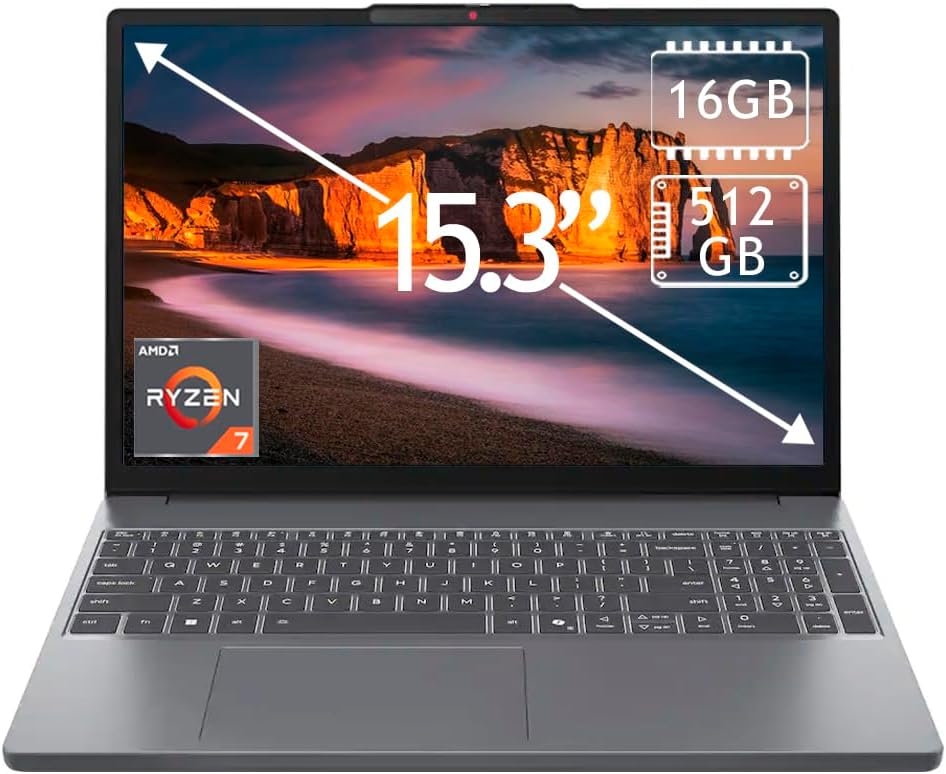
This IdeaPad delivers a sharp 2K touchscreen with 16GB DDR5 RAM. It holds a five-star rating for its smooth multitasking and responsive touch interface for work and entertainment.
We may earn a commission when you buy through this link, at no additional cost to you.
The AMD Ryzen 7 170 processor ensures fast performance daily tasks. Its 15.3 inch screen offers vibrant colors making it pleasant for streaming and browsing.
While it uses Wi-Fi 6 instead of 7, it remains stable. The design is solid for students needing a touchscreen without the premium price tag.
We suggest this for those prioritizing touch input. It is a reliable choice for daily computing and light creative tasks.
The 15.3 inch 2K touchscreen delivers sharp visuals and vibrant colors. It supports smooth touch interaction for easy navigation.
Powered by AMD Ryzen 7 170 for fast responsive multitasking. It handles productivity tasks without slowdowns effectively.
We may earn a commission when you buy through this link, at no additional cost to you.
The Dell 16 Plus is a professional-grade laptop with Core Ultra 9 power. It features 32GB LPDDR5X RAM for unmatched stability and speed in business environments.
We may earn a commission when you buy through this link, at no additional cost to you.
With Wi-Fi 7 and Thunderbolt 4 support, it offers cutting-edge connectivity. The 16 inch FHD Plus touchscreen enhances productivity with detailed visuals and touch control.
Users note its modular design supports durability. The fingerprint reader adds security which is crucial for business users managing sensitive data.
We recommend this for enterprise users needing top-tier performance. It is a robust solution for demanding workflows and collaboration.
Copilot+ PC enables on-device AI features like Studio Effects. It runs advanced AI tasks for meetings and content creation smoothly.
Features a sleek modular design with rounded edges for easy carrying. It offers enhanced durability and professional aesthetics.
We may earn a commission when you buy through this link, at no additional cost to you.
This HP model stands out with 32GB RAM and 1TB SSD at a mid-range price. It handles demanding multitasking with ease across applications and cloud services.
We may earn a commission when you buy through this link, at no additional cost to you.
The 15.6 inch FHD touchscreen provides sharp visuals for daily work. It includes Windows 11 Pro for enhanced productivity tools for office tasks.
While it uses Wi-Fi 6, the connectivity remains reliable. The privacy shutter camera helps maintain security during virtual meetings.
We suggest this for heavy multitaskers on a budget. It offers high specs for the price point effectively.
With 32GB RAM you can keep multiple applications open without slowdowns. This ensures efficient switching between projects quickly.
Includes USB-C two USB-A ports HDMI 1.4 and audio jack. It provides essential connections for daily workspace setups.
We may earn a commission when you buy through this link, at no additional cost to you.
The Aspire Go 15 is a lightweight notebook ideal for everyday computing. It uses Ryzen 7 processor to deliver responsive multitasking and excellent power efficiency.
We may earn a commission when you buy through this link, at no additional cost to you.
Its 15.6 inch FHD IPS display offers vibrant colors and wide viewing angles. The narrow bezels make it comfortable for work and entertainment.
Although it uses Wi-Fi 6, the laptop supports modern ports. The 16GB RAM ensures smooth application loading for daily tasks.
We recommend this for students needing a portable option. It balances performance and style effectively for daily use.
Equipped with 16GB LPDDR4X and 512GB SSD for quick boot. This ensures smooth application loading and responsive multitasking.
Features a slim Pure Silver chassis for portability. It combines style with dependable performance for home or office.
We may earn a commission when you buy through this link, at no additional cost to you.
This model integrates Copilot AI for enhanced productivity assistance. It uses Ryzen 7 processor to ensure smooth and responsive performance for tasks.
We may earn a commission when you buy through this link, at no additional cost to you.
The display includes BluelightShield to reduce eye strain. AcerSense allows intuitive device control for optimal battery and app management.
While it uses DDR4 RAM, the 512GB Gen4 SSD ensures speed. It is a solid choice for general computing needs.
We suggest this for users wanting AI features on a budget. It balances usability and modern connectivity well.
Access Copilot with a single touch of the Copilot Key. It centralizes generative AI assistance across multiple applications.
Features 1080p Full HD IPS display with narrow bezels. It offers a sharp detailed view for web browsing and movies.
We may earn a commission when you buy through this link, at no additional cost to you.
Selecting the right laptop involves evaluating several key factors beyond just connectivity. Consider how each spec impacts your daily workflow to ensure you invest in a machine that meets your needs.
Modern laptops often include AI-driven chips like Intel Core Ultra or AMD Ryzen with NPUs. Look for processors that support Copilot+ features for smarter workflows and faster content creation without lag.
Prioritize models with NPUs if you want to leverage new AI tools for productivity and security.
RAM determines how many apps you can run simultaneously. 16GB is the sweet spot for most users while 32GB is ideal for heavy multitasking or professional workflows.
Choose at least 16GB for future-proofing and smooth performance across multiple windows.
Screen size affects portability and workspace. Larger screens like 17 inches are great for productivity but smaller 13 to 15 inch models are better for travel.
Look for IPS panels with high brightness (300+ nits) and resolution for clear visuals.
Battery life varies by usage. Aim for 10 hours or more to get through a full work or school day without needing a charger nearby.
Check reviews for real-world battery performance to ensure it matches advertised specs.
Ensure the laptop has the ports you need like USB-C, HDMI, and Thunderbolt. WiFi 7 connectivity is crucial for future-proofing against network congestion.
Select models with diverse port options to avoid needing external dongles constantly.
SSDs offer faster boot and load times than HDDs. 512GB is standard but 1TB provides more room for large files and applications.
Opt for at least 512GB SSD to store your projects and media comfortably.
A sturdy chassis ensures durability over time. Aluminum designs are lighter and more durable than plastic alternatives for daily carrying.
Look for designs that feel premium and can withstand travel wear.
Windows 11 offers modern interface and productivity tools. Ensure the laptop supports latest OS features like Copilot and security updates.
Choose a model with the latest OS for smooth user experience.
Keep your laptop clean by using a microfiber cloth to wipe the screen and keyboard regularly. Avoid placing liquids near the device to prevent accidental damage to internal components.
Update your firmware and BIOS frequently to ensure WiFi 7 performance remains optimal. Use system tools to check for driver updates regularly.
Store your laptop in a protective case when traveling to prevent scratches and impacts. Use a cooling pad during intensive tasks to maintain performance and longevity.
WiFi 7 offers significantly faster speeds and lower latency compared to previous standards. It supports up to 3x faster data transfer and improved stability for streaming and video conferencing.
While you can use WiFi 7 laptops with older routers, you will get the full benefit with a compatible WiFi 7 router. Most laptops also support backward compatibility with WiFi 6.
16GB of RAM is the recommended minimum for multitasking and productivity. If you plan to run heavy applications or keep many tabs open, consider 32GB for better performance.
AI features like Copilot help with text summarization, coding, and search tasks. They can streamline workflows by automating repetitive actions and providing instant suggestions.
The Acer Aspire 14 offers up to 22 hours of battery life making it ideal for travel. Apple MacBook Air also provides around 18 hours of power efficiency.
Many modern laptops have onboard RAM which cannot be upgraded. Check product specifications before buying to ensure it meets your long-term needs.
SSDs are faster and more durable than HDDs allowing quicker boot and load times. Most modern laptops include SSDs as standard storage for better performance.
Touchscreens allow for more intuitive interaction with content and gestures. They are useful for creative tasks or presentations but may add to cost and weight.
We reviewed ten top models from HP Apple and Acer to find the best options for every need. Whether you want AI power battery life or budget value this guide covers key picks.
Prioritize specs like RAM and connectivity that match your workflow. If you need portability choose thinner models. For productivity focus on display quality and memory.
Prices and availability change frequently so check the links for the latest deals. We hope this detailed comparison helps you find the perfect device that matches your needs.