
Coral M.2 Accelerator B+M Key
5.0Editor score
4 TOPS Edge TPU performance
Debian Linux compatibility
TensorFlow Lite support
This guide compares the top M2 accelerator cards for AI inference and edge computing, evaluating performance, compatibility, and power efficiency for diverse
M2 accelerator cards are essential for enhancing machine learning inference on edge devices and embedded systems. These compact modules deliver high performance while maintaining low power consumption for critical applications.
We evaluated ten leading M2 accelerator cards based on processing power, software support, and hardware compatibility. Our analysis covers diverse options from Coral to MemryX and Hailo.
Each pick highlights specific strengths for vision tasks, model deployment, and system integration. Prices and availability fluctuate frequently, so verify current listings before purchase decisions.
5.0Editor score

4.3Editor score

4.6Editor score
The following table provides a side-by-side comparison of all ten M2 accelerator cards to help you quickly identify the right fit for your specific hardware and software requirements.


The MX3 M.2 AI Accelerator stands out as a powerful solution for demanding AI computer vision workloads. With a 4.3 rating, it offers high performance while minimizing power consumption, making it ideal for embedded projects.
We may earn a commission when you buy through this link, at no additional cost to you.
Its flexible integration supports the PCI-SIG M.2 M-key 2280 specification, allowing seamless connection to systems like the Raspberry Pi 5. The comprehensive SDK streamlines development, ensuring faster time to market for custom applications.
While the MX3 excels in performance and efficiency, its focus on Linux may limit users reliant on Windows environments. However, for edge deployments prioritizing efficiency and speed, this trade-off is often acceptable.
Developers seeking a robust AI accelerator for vision tasks should consider the MX3. Its balance of power and efficiency makes it a top choice for scalable edge computing solutions.
The MX3 handles complex computer vision tasks with exceptional efficiency, ensuring smooth operation even under heavy loads.
A full SDK simplifies development and deployment, enabling rapid prototyping and production-ready model integration.
We may earn a commission when you buy through this link, at no additional cost to you.
This M.2 Accelerator with Dual Edge TPU delivers solid machine learning inference capabilities for budget-conscious projects. Rating 4.1, it features two Google Edge TPUs for a total of 8 TOPS peak performance.
We may earn a commission when you buy through this link, at no additional cost to you.
Each TPU offers 2 TOPS per watt, making it highly energy efficient for continuous edge deployments. The PCIe Gen2 x1 interface per TPU ensures compatibility with many modern systems.
However, the 2230 size may limit physical integration in some enclosures, and Gen2 bandwidth might bottleneck high-throughput applications. Still, it provides strong value for entry-level AI tasks.
Users needing a cost-effective AI booster should evaluate this dual TPU module. Its efficiency and performance balance make it suitable for robotics and smart device prototypes.
Two Edge TPU modules combine to deliver higher inference throughput for more complex models and multi-stream processing.
With 2 TOPS per watt, it minimizes power draw while maintaining consistent performance for battery-powered edge systems.
We may earn a commission when you buy through this link, at no additional cost to you.
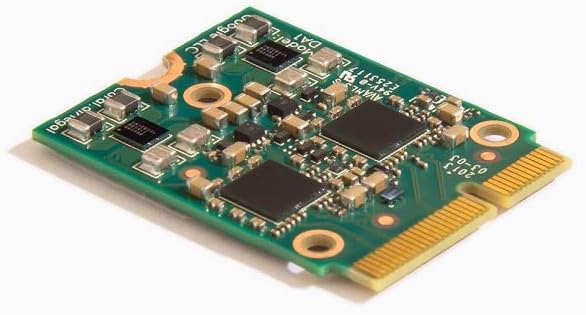
The Coral M.2 Accelerator with B+M Key achieves a perfect 5.0 rating for its reliable high-speed ML inferencing. It uses an on-board Edge TPU coprocessor to execute 4 trillion operations per second efficiently.
We may earn a commission when you buy through this link, at no additional cost to you.
It integrates seamlessly with Debian-based Linux systems and supports TensorFlow Lite models without rebuilding from scratch. Users can deploy MobileNet v2 at 400 FPS with minimal power usage.
While it is limited to Edge TPU models and Debian Linux, its efficiency and speed make it ideal for mobile vision tasks. The AutoML Vision Edge feature simplifies custom model deployment.
For users needing a top-tier AI accelerator for vision, this Coral module is unmatched. Its reliability and performance make it a best premium choice for professional deployments.
The Edge TPU delivers 4 TOPS for rapid inference on state-of-the-art mobile vision models with exceptional efficiency.
Users can build and deploy custom high-accuracy image classification models easily with AutoML Vision Edge tools.
We may earn a commission when you buy through this link, at no additional cost to you.
The QNAP QM2-2P10G1TB is a versatile expansion card for storage and networking needs. Rating 4.4, it offers two PCIe Gen3 NVMe SSD slots plus a 10GbE port for high-speed connectivity.
We may earn a commission when you buy through this link, at no additional cost to you.
It uses Marvell's AQtion AQC113C Ethernet controller and supports QNAP's QTS, QuTS hero, Windows, and Linux OS. The PCIe Gen 3 x8 interface ensures robust bandwidth for intensive operations.
Though it lacks AI-specific capabilities, it enhances system performance through fast storage caching and network expansion. Users needing to upgrade NAS or workstation I/O will find it practical.
For infrastructure upgrades requiring storage and network expansion, this QNAP card delivers reliability. Its dual functionality makes it a strong choice for business environments.
Dual M.2 NVMe slots and 10GbE ports enable high-speed data access and connectivity for advanced workloads.
Compatibility with Windows, Linux, and QNAP OS ensures flexible deployment across various server configurations.
We may earn a commission when you buy through this link, at no additional cost to you.
The Rocket 1604L offers next-generation PCIe Gen5 connectivity for demanding high-speed storage needs. It supports four M.2 NVMe devices with dedicated x4 lanes per port for maximum performance.
We may earn a commission when you buy through this link, at no additional cost to you.
Native support across mainstream OS ensures seamless integration on Intel, AMD, and ARM platforms. Its PCIe 5.0 x16 bus delivers unmatched bandwidth for future-proof setups.
While primarily for storage, its robust design supports workloads needing fast data I/O. The lack of AI features limits its utility for inference but ensures raw speed for data tasks.
Users seeking top-tier bandwidth should consider this Gen5 expansion card. Its forward-looking design makes it ideal for high-performance computing environments requiring massive storage throughput.
The PCIe 5.0 x16 interface provides industry-leading bandwidth for ultra-fast data transfers in demanding workflows.
Each of the four ports gets dedicated x4 lanes, eliminating bottlenecks when running multiple NVMe devices.
We may earn a commission when you buy through this link, at no additional cost to you.
The Dual Edge TPU PCIe Adapter transforms your system into a dual-TPU workstation for accelerated AI workloads. It accepts two Coral M.2 Accelerator Cards via a PCIe Gen3 x4 splitter.
We may earn a commission when you buy through this link, at no additional cost to you.
This adapter is developer-friendly for TensorFlow Lite and computer vision applications. It maximizes existing hardware investment, allowing projects to scale without buying a new system.
While it needs pre-existing Coral TPUs and may reduce per-card bandwidth due to lane splitting, it offers significant value for high-throughput edge AI deployments.
Users looking to scale inference capabilities cost-effectively should explore this adapter. It provides a practical path to multi-TPU performance in compact edge setups.
Transforming your system into a dual-TPU machine learning workstation enables faster object detection and video analytics.
Designed for TensorFlow Lite models and edge AI deployments, it simplifies integration for computer vision apps.
We may earn a commission when you buy through this link, at no additional cost to you.
The ASUS Hyper M.2 x16 Gen5 Card provides exceptional thermal management for four NVMe drives. It supports up to 512 Gbps bandwidth with server-grade PCB and active cooling components.
We may earn a commission when you buy through this link, at no additional cost to you.
A large heatsink, thermal pads, and active fan ensure unthrottled transfer speeds. The 6-pin PCIe power connector and RAID support enhance reliability for high-demand applications.
While it is not an AI accelerator, its robust cooling and RAID features make it ideal for workstations needing sustained storage performance. Extra fan cables allow flexible control.
Users prioritizing thermal stability and RAID capabilities should consider this ASUS card. Its design ensures consistent performance for intensive storage operations.
A large heatsink and active fan reduce temperatures to prevent throttling and extend drive reliability under load.
Support RAID functions across platforms to create bootable arrays with up to four M.2 SSDs for redundancy.
We may earn a commission when you buy through this link, at no additional cost to you.
The waveshare Hailo-8 M.2 AI Accelerator Module delivers 26 TOPS for real-time, low latency inferencing. With 2.5W typical consumption, it balances high performance with efficiency for edge devices.
We may earn a commission when you buy through this link, at no additional cost to you.
It supports Linux and Windows systems and runs models via TensorFlow, ONNX, and Pytorch frameworks. Its scalable design enables simultaneous processing of multiple streams and models.
While it needs a Raspberry Pi 5 HAT for that platform and draws slightly more power than TPUs, its raw speed makes it perfect for complex AI tasks.
Users needing powerful multi-stream AI capabilities should choose this Hailo-8 module. Its versatility and performance support diverse professional and industrial applications.
The Hailo-8 processor delivers 26 TOPS for high-efficiency inference on complex vision and analytics models.
Simultaneous processing of multiple streams and models ensures smooth real-time performance for surveillance and robotics.
We may earn a commission when you buy through this link, at no additional cost to you.
The Coral M.2 Accelerator with A+E Key offers a compact solution for embedded and energy-efficient applications. Rating 4.2, it delivers 4 TOPS peak performance with 2 TOPS per watt efficiency.
We may earn a commission when you buy through this link, at no additional cost to you.
Compatible with Linux and Windows 10, it supports a wide range of OS for flexible integration. Its industrial-grade reliability ensures operation in harsh environments from -20°C to +85°C.
While it has lower TOPS than other modules and uses a smaller form factor, its robustness makes it ideal for portable and industrial deployments.
Users needing a reliable, compact AI accelerator should consider this Coral module. Its wide OS support and durability make it suitable for diverse embedded projects.
The A+E key interface allows easy integration into existing systems with standard M.2 slots.
Operating across -20°C to +85°C ensures stable performance in challenging industrial and outdoor environments.
We may earn a commission when you buy through this link, at no additional cost to you.
This Coral Dual Edge TPU Adapter maximizes AI inference performance when paired with a Coral M.2 Accelerator with Dual Edge TPU. It fits standard M.2 2280 B-key or M-key slots for easy installation.
We may earn a commission when you buy through this link, at no additional cost to you.
The adapter offers bidirectional Gen2 bandwidth to ensure consistent data flow. A stainless steel mounting screw provides vibration-resistant fixation, enhancing reliability in mobile or industrial use.
While it is incompatible with Raspberry Pi CM4 or SATA M.2, its robust design and compatibility with standard slots make it highly practical for PCIe environments.
Users needing a reliable adapter for dual TPU modules should choose this board. Its vibration-resistant design and straightforward integration make it an excellent final piece.
Designed exclusively for Coral dual TPU modules, this adapter ensures optimal AI inference performance for edge workloads.
A stainless steel mounting screw secures the PCB firmly, protecting against vibration in demanding environments.
We may earn a commission when you buy through this link, at no additional cost to you.
Selecting the right M2 accelerator card requires balancing performance needs, software compatibility, and physical constraints for your specific application.
Processing power is measured in TOPS (Tera Operations Per Second). Higher TOPS values enable faster inference for complex models like object detection or segmentation. Evaluate the workload complexity to determine if 4, 8, or 26 TOPS is necessary for your use case.
Choose higher TOPS for demanding AI tasks and lower TOPS for simpler classification or detection needs.
M2 cards come in various sizes like 2230 and 2280, with interfaces like M-key, E-key, or A+E key. Ensure your system has the matching physical slot and interface type to avoid compatibility issues.
Verify physical dimensions and connector types before purchasing to ensure seamless integration into your device.
Most AI accelerators support Linux, especially Debian-based systems. Some also support Windows 10 or Windows 11 for broader deployment. Confirm OS compatibility to avoid development blockers when deploying models.
Ensure the accelerator supports your primary OS environment for smooth development and deployment.
Software support varies by vendor. TensorFlow Lite, ONNX, Keras, and Pytorch are common framework requirements. A comprehensive SDK simplifies model compilation and deployment across devices.
Check for comprehensive SDKs and supported frameworks to streamline your development workflow.
Efficiency is critical for battery-powered or thermal-constrained systems. Look for cards offering 2 TOPS per watt or lower power draw to maintain energy efficiency. High performance should not come at the cost of excessive heat.
Prioritize low-power designs for edge and mobile deployments to extend battery life and reduce cooling needs.
Industrial applications may require wide temperature ranges like -40°C to +85°C. Verify operating temperatures to ensure stability in extreme environments such as outdoor monitoring or manufacturing.
Check environmental ratings to guarantee reliable operation in harsh or variable conditions.
Consider how the card fits into your system. Some adapters support Raspberry Pi 5 via HATs while others need PCIe slots. Evaluate the integration method to avoid extra hardware costs.
Match the integration method to your system architecture to ensure straightforward setup and use.
Some solutions support multiple cards or dual TPUs for increased throughput. If your project may scale, choose an adapter or system that allows adding more accelerators without replacing hardware.
Opt for scalable solutions to accommodate growing data and processing needs over time.
Install the M2 accelerator card into the matching slot and secure it with the provided screws. Ensure the connector is aligned properly before applying pressure to avoid damaging pins.
Install the necessary drivers and SDKs from the manufacturer website. For Linux systems, ensure kernel headers are installed and follow the documentation to compile models efficiently.
Maintain thermal stability by keeping airflow around the card and avoiding dust buildup. Use monitoring tools to check temperatures during heavy workloads and prevent throttling.
M2 accelerator cards are specialized hardware modules designed to speed up machine learning inference tasks on edge devices. They enable real-time processing for applications like object detection, image classification, and video analytics while minimizing power consumption and CPU load.
Some M2 accelerator cards like the MX3 and waveshare Hailo-8 are compatible with Raspberry Pi 5 via M-key 2280 HATs. Always verify the specific adapter or carrier board requirements before purchasing for Pi integration.
Yes, several M2 accelerator cards such as Coral and Hailo-8 support Windows 10 and Windows 11. However, many are optimized for Linux environments so check documentation for Windows-specific driver availability.
Check your device's specifications for supported M2 key types like M-key, E-key, or A+E key and sizes like 2230 or 2280. Using the correct form factor ensures physical compatibility and proper electrical connection.
TPUs like Google's Edge TPU are optimized for specific AI inference tasks with high efficiency. General AI accelerators may support broader frameworks like Pytorch or ONNX, offering more flexibility for diverse model architectures.
High-performance cards like ASUS Hyper or Hailo-8 may require active cooling or heatsinks to prevent throttling. Lower-power options like Coral often rely on passive cooling but still benefit from good airflow in enclosures.
The top picks for M2 accelerator cards range from the MX3 and Coral B+M to the Hailo-8 module, each offering distinct strengths for AI inference and edge computing. Whether you need 4 TOPS or 26 TOPS, there is a solution tailored to your performance budget.
Prioritize compatibility with your operating system and physical form factor when selecting a card. Software support and SDK availability are just as critical as raw performance for successful project deployment.
Prices for M2 accelerator cards fluctuate frequently so verify current listings on Amazon before finalizing your purchase. Check availability and compatibility notes to ensure a smooth integration into your existing hardware setup.